
It was 7:46 in the morning. I had my phone, a cup of tea, and a prompt I had spent about five minutes writing. I pasted it into a new Claude conversation and hit send.
The prompt asked Claude to build a complete personal finance tracker app, specifically for Nigerian freelancers and online entrepreneurs, with a dashboard, transaction categories, a budget warning system, local storage, and a guide explaining how to use the app. Dark navy and gold design. Mobile responsive.
By 7:48 AM, I was staring at a fully functional, interactive application called NairaTrack Pro.
Two minutes. One prompt. No code. Free plan.
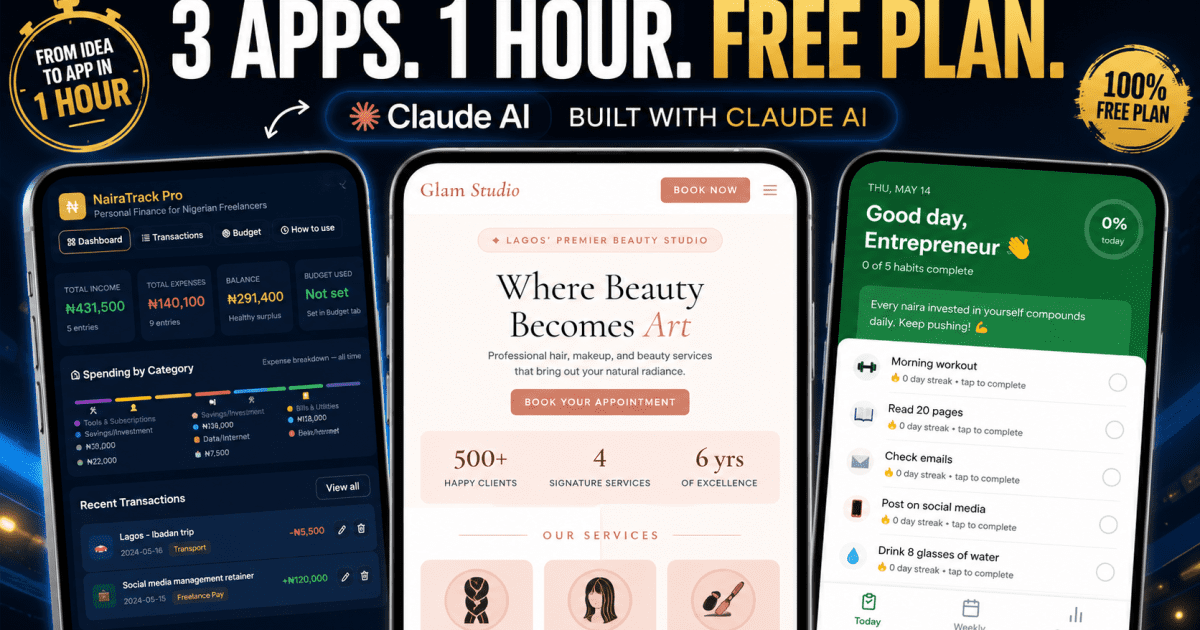
I spent the next hour testing two more apps: a salon booking system and a habit tracker. By 8:37 AM I had three working applications, all built from plain English descriptions, all running directly in the browser, all with Nigerian context baked in without me asking for it specifically.
This post is what actually happened. The real screenshots, the honest observations, and the exact prompts I used so you can test this yourself, because building an app with Claude AI is not a developer trick. It is something anyone can do right now, today, on the free plan.
Key Takeaway
The bigger shift is not that AI can write code. It is that an idea can become a working prototype in minutes, on a phone, for free. That does not remove the need for good judgment. It makes judgment more important. Knowing what to ask for, what to fix, and what is missing still separates someone who gets a real result from someone who types one vague sentence and hopes for magic.
Before We Get Into It: What This Actually Is
Claude does not just write code. It builds what Anthropic calls artifacts: complete, interactive applications that run directly inside the Claude conversation window. You can click buttons, fill in forms, navigate between pages, and interact with the app in real time without opening any other tool, installing anything, or knowing a single line of code.
It feels less like chatting with an AI and more like watching a developer build a live prototype beside you in real time. The app appears in a preview panel on the right side of the screen while Claude writes, updates, and renders the interface live.
The apps are built in HTML, CSS, and JavaScript, or React depending on the complexity of what you describe. They save data to your browser’s local storage, which means information you enter persists between sessions on the same device. Claude makes every design decision itself: colour palette, font choices, layout structure, navigation, error messages, and empty states, all based on what you describe in your prompt.
You can also copy or download the generated code from the artifact panel, then refine it further, share it with a developer, or use it as the starting point for a more serious project outside Claude.
Everything I am about to show you was built on the Claude free plan. No subscription. No API key. Just a Google account sign-in at claude.ai and a well-written prompt. If you do outgrow the free tier later, here’s how to actually pay for AI tools from Nigeria, since that’s its own hurdle worth knowing about upfront.
App 1: NairaTrack Pro, a Personal Finance Tracker for Nigerian Freelancers
This was the first prompt I tested, and the one I was most curious about because it was the most specific to our audience.

The prompt asked for income and expense tracking with categories specific to Nigerian freelancers: Freelance Pay, Data/Internet, Tools and Subscriptions, Content Creation, Transport, Food, and Bills. A monthly budget with a warning when spending gets close. Sample data for immediate testing. Dark navy and gold colours. A “How to use this app” section inside the interface itself.
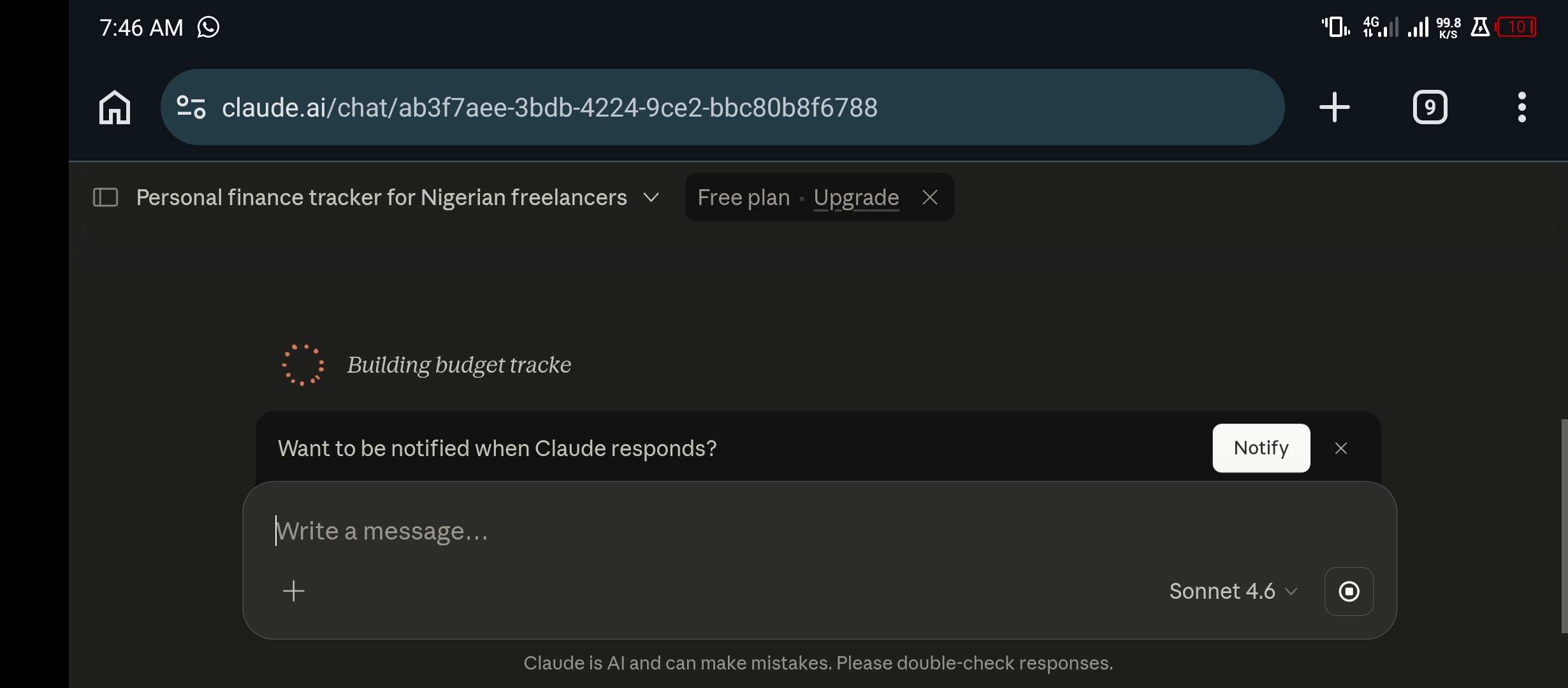
The moment I sent it, Claude named the conversation “Personal finance tracker for Nigerian freelancers” automatically and began working. The notification prompt appeared, “Want to be notified when Claude responds?”, which told me this was going to take at least a few seconds. I clicked Notify and waited.
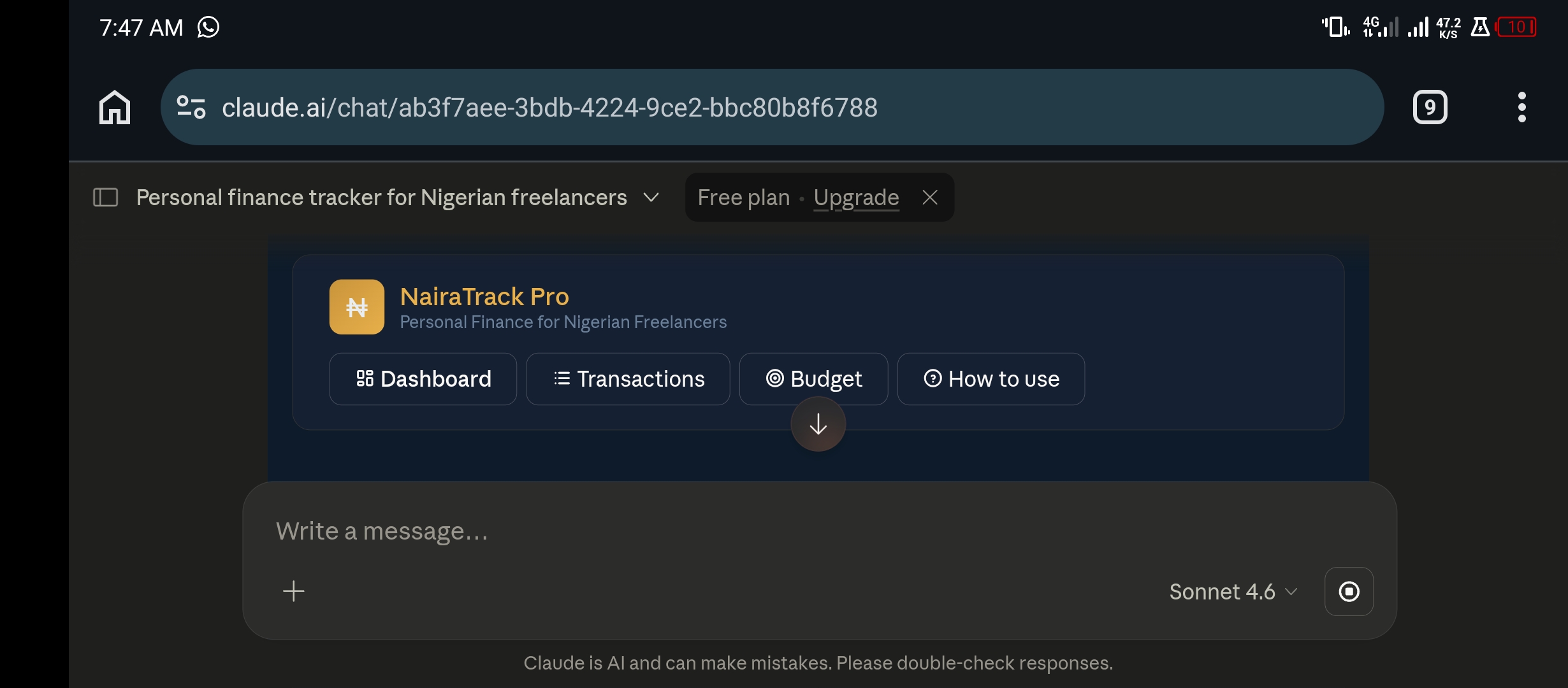
Less than two minutes later, the app appeared. Claude had named it NairaTrack Pro. I did not suggest that name anywhere in my prompt; it chose it. The navigation showed four tabs: Dashboard, Transactions, Budget, and How to use, in a dark navy background with gold accent text, exactly as described.

What the App Actually Contains
The How to Use tab was where I first realised how much thought Claude had put into the details. It generated a step-by-step guide written in plain English, covering every feature: how to navigate between tabs, how to add transactions, how to use the category system, how to set a budget, how to filter transactions, and a note that all data is saved automatically to local storage.
Below that was a full Category Guide, with visual cards for every income and expense category, colour coded by type.

The Budget tab showed a Monthly Budget Settings panel with fields for income goal, expense limit, and warning threshold, pre-set at 80 percent. Below that, a Budget Progress section with live bars tracking income versus goal and expenses versus limit.
The “This Month at a Glance” panel showed 14 sample transactions already loaded, an average transaction of ₦40,829, a savings rate of 68 percent, and the top expense category: Tools and Subscriptions.
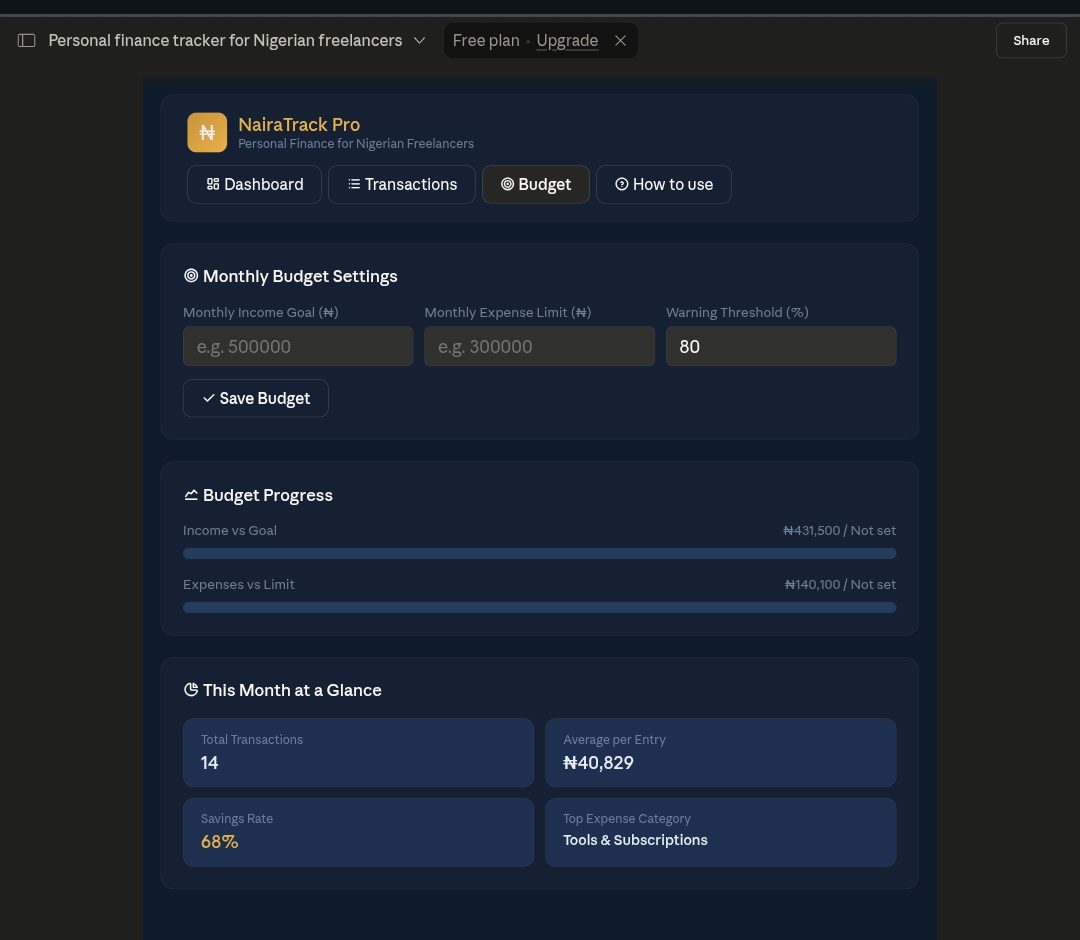
Total time from sending the prompt to having a fully functional, interactive finance tracker was approximately two minutes, on the free plan.
App 2: Glam Studio, a Booking App for a Nigerian Hair Salon
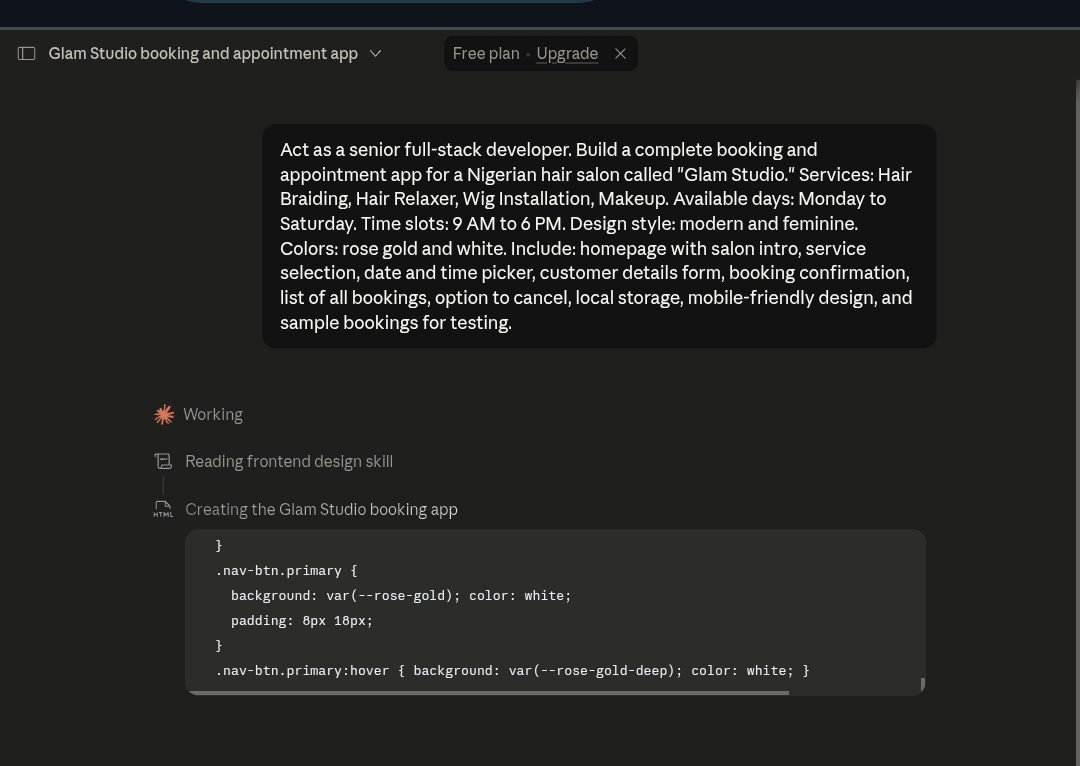
The second prompt was for a booking and appointment system for a specific business: a Nigerian hair salon called Glam Studio. I specified the services, the pricing structure, the available days, and the design style. Rose gold and white, modern and feminine.

This one took slightly longer because it was more complex: a multi-page booking system rather than a single-page tracker. Claude showed its working process step by step: “Working,” then “Reading frontend design skill,” then “Creating the Glam Studio booking app.” I could see CSS code appearing in the artifact panel as it wrote the styles in real time, including variables for the rose gold colour.

The Moment That Stopped Me
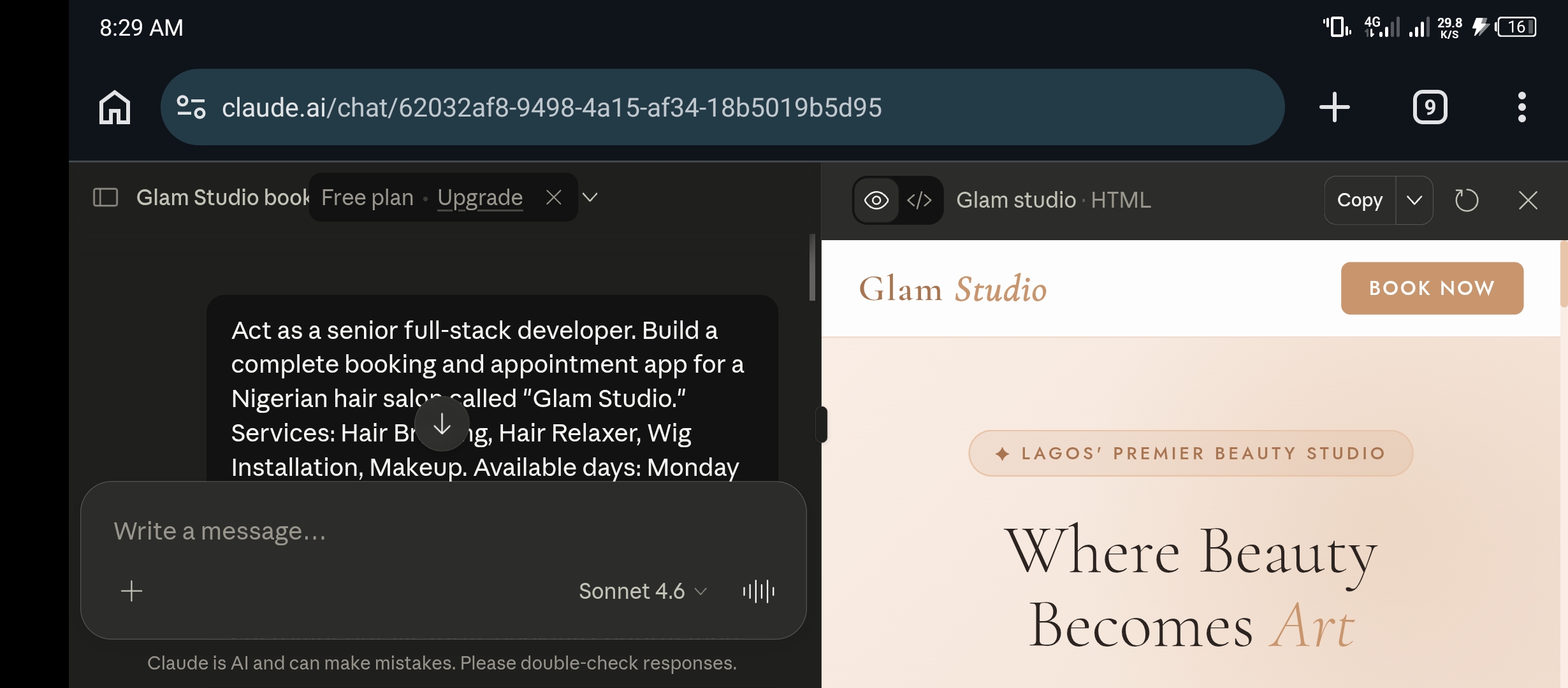
When the app finished building and I saw the preview panel, the first thing that jumped out was not the design. It was three words Claude had added without being asked: “Lagos’ Premier Beauty Studio.”
I never mentioned Lagos in my prompt. I said “Nigerian hair salon.” Claude inferred that Lagos was the most likely city for a premier beauty studio in Nigeria and added that detail to the hero section of the homepage. The app already understood its context in a way that a generic template never would.
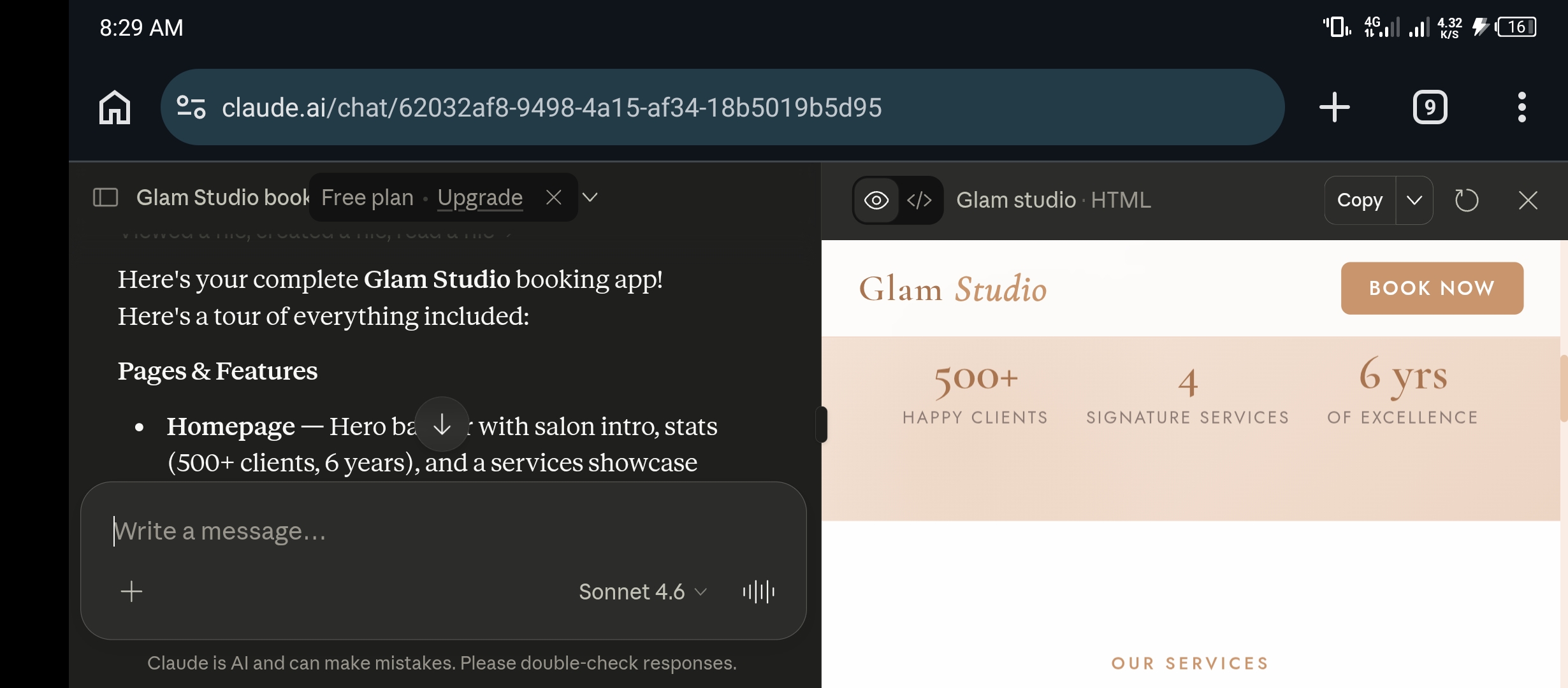
The services section showed all four offerings with proper descriptions and Nigerian Naira pricing. Hair Braiding with its description and From ₦15,000. Wig Installation at From ₦12,000. Each service card had a relevant emoji, a full description, and a clear starting price, all written by Claude based on the service names I provided.

From prompt to finished booking app: approximately five minutes. The design could go live on a real salon’s website with very few modifications.
The strange part was not that Claude built the app. It was how believable it felt. If someone told me a real salon designer had mocked up this interface for a client presentation, I would have believed them immediately.
App 3: HabiTrack, a Habit Tracker for Nigerian Entrepreneurs
The third prompt was deliberately simpler: a habit tracker with a specific audience and motivational tone. I asked for calming green and white colours, sample habits preloaded, and progress tracking with streaks.
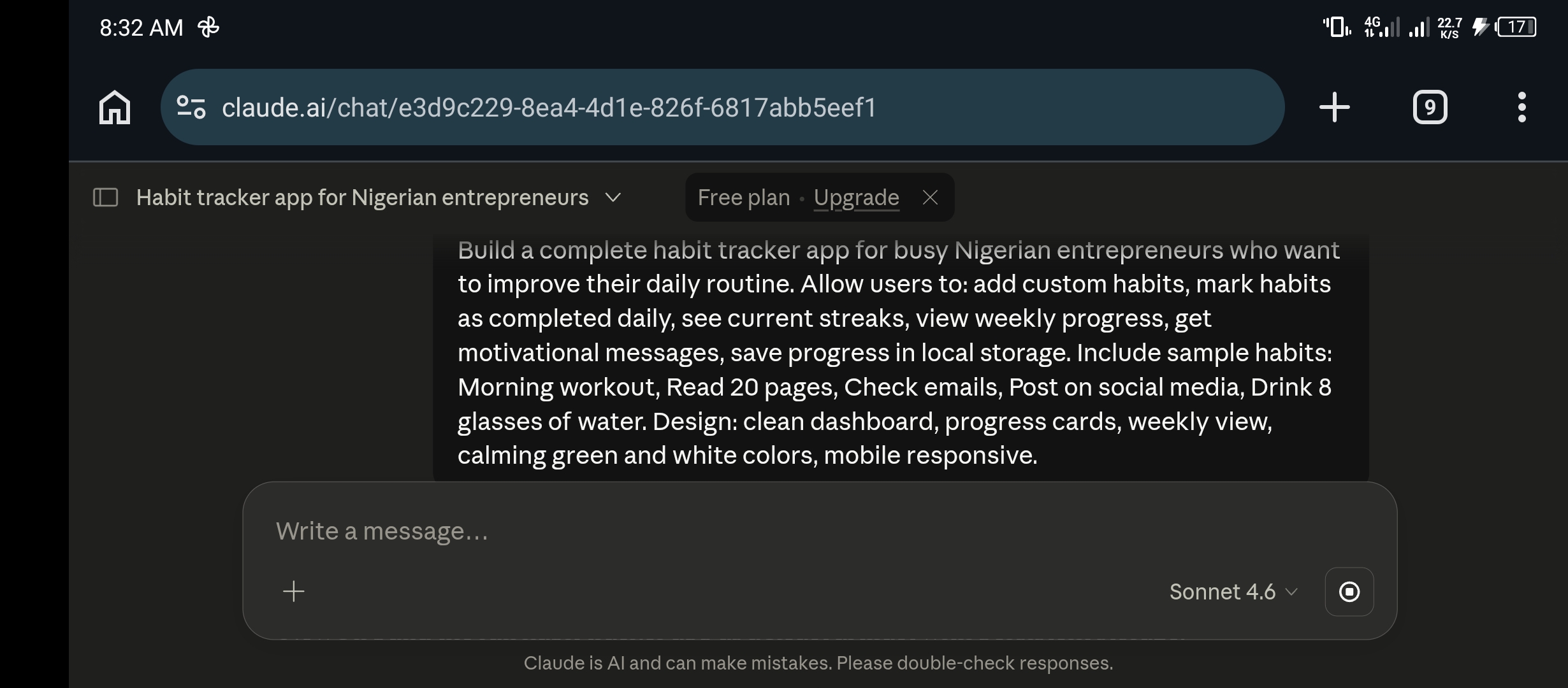
Claude chose to build this one as a React artifact, a more sophisticated approach than the HTML app for the finance tracker. It announced this itself: “Now I’ll build the full habit tracker app as a React artifact with persistent storage.” The loading indicator appeared while it compiled.
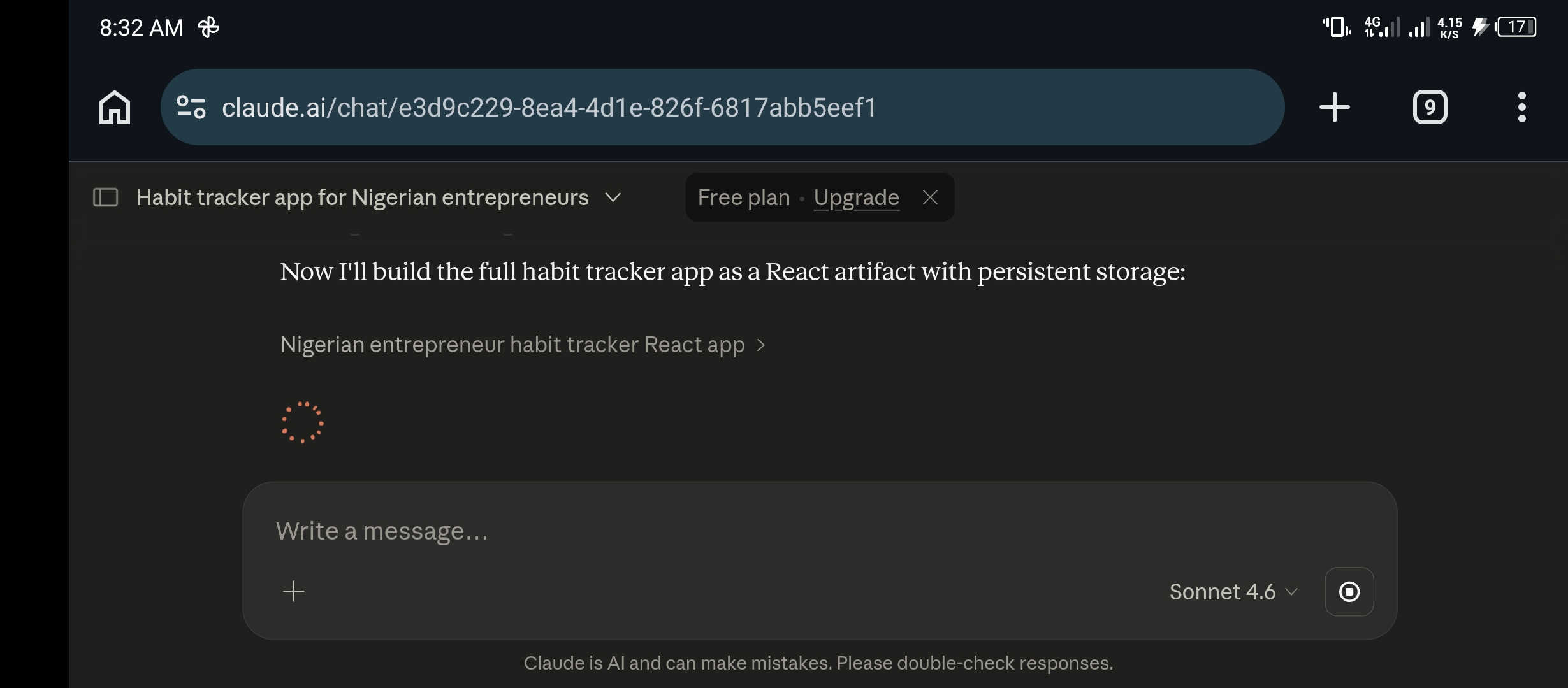
What It Said When It Finished
When HabiTrack appeared, the header read: “Good day, Entrepreneur 👋.” Below that: “0 of 5 habits complete.” Then a motivational message that Claude wrote entirely on its own: “Every naira invested in yourself compounds daily. Keep pushing! 💪”
I read that line twice. I had asked for motivational messages in my prompt, but Claude chose to anchor the motivation specifically to the Nigerian context: naira, not dollars. That level of contextual awareness, from a free tool, in a single prompt, in under five minutes, was the moment that made me put down my tea.


All five sample habits were preloaded with appropriate icons: Morning workout with a gym icon, Read 20 pages with a book stack, Check emails with an email icon, Post on social media with a phone icon, and Drink 8 glasses of water with a water drop. Each showed a zero day streak with “tap to complete,” ready to be used immediately.

The Weekly tab showed a full calendar grid: every habit as a row, every day of the week as a column, with today’s column highlighted and the current date accurately reflected as Thursday May 14. The Progress tab had four stat cards showing today’s completion rate, best streak, weekly total, and active habit count.


The Honest Observations Worth Knowing
Three working apps in under an hour, all on the free plan, is genuinely impressive. But there are real details worth knowing before you sit down to try this yourself.
The Session Limit Is Real
You can see in the HabiTrack screenshots that a banner appeared at the bottom of the conversation: “You’ve used 90% of your session limit.” By the third app, I was close to the ceiling of what a single free session allows. ChatGPT users run into a similar wall, and the reasons ChatGPT stops mid-response come down to the same kind of session and context limits.
If you are planning to build multiple apps, or a particularly complex one, starting a fresh conversation for each project works better than trying to do everything in one session.
The More Specific Your Prompt, the Better the Output
All three of my prompts were detailed. I specified the target audience, the features, the categories, the colour scheme, and the general design feel. The prompts I gave you earlier in this post are intentionally specific, not minimal, and that specificity is what produces an app that looks like it was designed for your actual users rather than a generic demo.
Vague prompts produce vague apps. “Build me a finance tracker” will give you something. “Build me a finance tracker for Nigerian freelancers with these specific categories, this colour scheme, sample data, and a how-to section” will give you NairaTrack Pro.
Claude Makes Decisions You Did Not Plan For
Some of those decisions are excellent. “Lagos’ Premier Beauty Studio” and “Every naira invested in yourself compounds daily” were both things I would have wanted to write myself if I had thought of them.
Some may need adjustment. If Claude picks a font or layout direction that does not match your vision, you can follow up in the same conversation and ask it to revise specific elements. It will rebuild the affected section without touching the rest of the app.
These Are Frontend Apps, Not Backend Systems
Everything built here runs in the browser and saves to local storage. That means the data stays on one device, in one browser. There is no database, no cloud sync, no user accounts, and no way for different people to access the same data.
For personal tools, internal business tools, prototypes, and demos, this is more than sufficient. For a production app serving real customers who need to log in from different devices, you would need to take the Claude output as a starting point and add a backend. That is a separate conversation for a separate day.
This is why I see Claude artifacts as a powerful starting point rather than a complete replacement for professional software development. They make it dramatically easier to build apps with AI, test ideas, and create working demos. But serious production apps still need testing, security, hosting, databases, backups, and proper maintenance.
What This Actually Means for Your Business or Side Hustle
Think about what we built this morning and what it would have cost before Claude existed.
A custom finance tracker with your specific categories, your design, and your audience in mind: hiring a developer to build that would cost anywhere from ₦50,000 to ₦500,000 and take weeks. We built it in two minutes. A booking app for a salon with real services, Nigerian pricing, Lagos branding, and a full service catalogue follows the same math. So does a habit tracker with streak tracking, weekly views, and progress analytics.
For freelancers, this opens up a service category that barely existed twelve months ago. You can now offer to build custom apps for small business clients, booking systems for salons, inventory tools for shops, simple CRM systems for consultants, using Claude to produce the first working version in one session, then refining it based on client feedback. The skill is not coding. The skill is knowing how to write a prompt that gives Claude everything it needs to build something genuinely useful. If you want the fuller picture of turning AI skills into actual income from Nigeria, this breakdown of getting paid for AI side hustles is the natural next read.
For small business owners, this means tools you could never afford before are now accessible: a custom booking system that matches your brand and your services, built from a description of what you need. That is a meaningful shift for businesses that have always had to use generic software because custom software was priced for enterprises.
The Three Prompts to Start Testing Today
These are the exact prompts I used this morning, adapted and cleaned up for clarity. Paste them into a new Claude conversation exactly as they are, then fill in any detail marked in brackets with your own specifics.
Prompt One: Personal Finance Tracker
Act as a senior product designer and full-stack app builder. Build me a complete personal finance tracker app for Nigerian freelancers and online entrepreneurs. Users should be able to add income and expenses, choose categories like Freelance Pay, Data/Internet, Tools and Subscriptions, Content Creation, Transport, Food, and Bills. See total income, total expenses, and remaining balance. Set a monthly budget with a warning when they are close. Delete or edit transactions. Save all data in local storage. View a clean dashboard with summary cards. Design style: clean, modern, professional. Colors: [your preferred colours]. Include sample transactions for testing. Make it mobile responsive. Add a short “How to use this app” section inside.
Prompt Two: Booking and Appointment App
Act as a senior full-stack developer. Build a complete booking and appointment app for a [type of business] called [business name]. Services: [service 1], [service 2], [service 3]. Available days: [days]. Time slots: [start time] to [end time]. Design style: [your preferred style]. Colors: [your colours]. Include a homepage with business intro, service selection, date and time picker, customer details form, booking confirmation, list of all bookings, option to cancel, local storage, mobile-friendly design, and sample bookings for testing.
Prompt Three: Habit Tracker
Build a complete habit tracker app for [your target audience] who want to improve their daily routine. Allow users to add custom habits, mark habits as completed daily, see current streaks, view weekly progress, get motivational messages, and save progress in local storage. Include sample habits: [list your habits]. Design: clean dashboard, progress cards, weekly view, [your colour scheme], mobile responsive.
Open claude.ai, start a new conversation, paste your chosen prompt, and watch what happens. The free plan was sufficient for all three during my test. Each app will appear in the preview panel on the right side of the screen as Claude builds it, and you can interact with it immediately when the build completes.
One Hour. Three Apps. Free Plan.
When I started testing at 7:46 this morning I was curious but sceptical. I have seen enough impressive AI demos that turned out to be carefully staged, so I approached this with reasonable doubt.
By 8:37, the doubt was gone. Not because the apps are perfect. They are not, and I have told you what their limits are honestly. But what I built this morning would have been genuinely impossible for a non-technical person to produce without significant time, money, and outside help eighteen months ago. It happened in one hour, on a phone, for free.
The people who figure this out early are building a skill set that has real market value right now, not theoretical future value. They are learning which prompts produce which results, and developing the judgment to know when to refine an output and how to ask for specific changes.
Small businesses need tools they can afford. Freelancers need services they can offer. Claude can help build both.
Three apps. One hour. Free plan. Your turn.


















Join the discussion Tap to open the comment form +