

A friend recently told me something that made me look at ChatGPT account security differently.
According to his account, someone took over his ChatGPT account, changed the email address associated with it and left him unable to sign in. He believed the incident started after he clicked an option in a convincing fake Google Update prompt on his Windows computer.
He also reported that Windows Defender had flagged a suspicious file and that he suspected malware had stolen his browser session. By the time he was trying to recover his ChatGPT account, he was already dealing with the possibility that other accounts had been compromised too.
I could not independently verify every part of his account. I did not examine his computer, inspect the flagged file or establish how the attacker obtained access. So I would not present his suspected explanation as a confirmed technical finding.
But the incident raised questions worth investigating. If somebody takes over your ChatGPT account, can they read your old conversations? What happens if they change your email address? Can you recover the account? And what happens to a paid subscription you can no longer manage?
I looked at OpenAI’s published guidance and other publicly reported cases to separate what is known from what remains uncertain.
This is one reason why I went deep into the investigation.
How a ChatGPT Account Could Be Taken Over
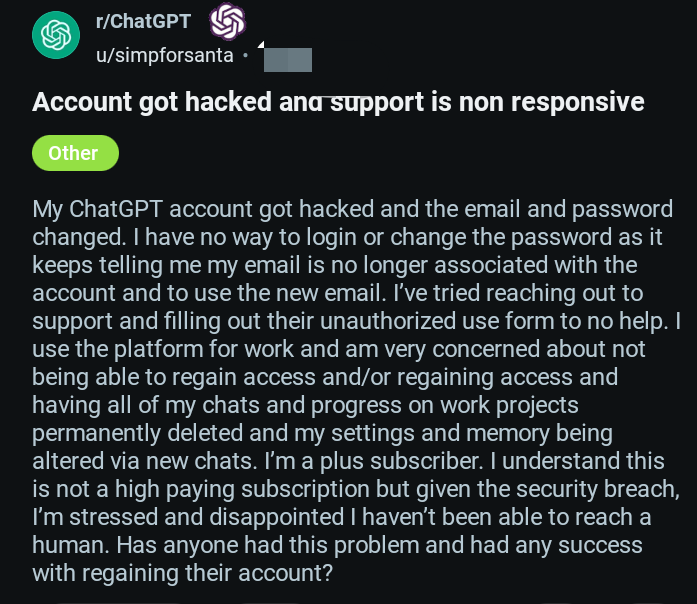
When someone loses access to an online account, it is tempting to assume that the service itself must have been hacked. But an account takeover does not necessarily mean the service suffered a platform-wide breach.
Several different routes can lead to an attacker gaining control of an individual account. These include:
- Stolen passwords: An attacker obtains a password through phishing, malware, a data leak or reuse of a password exposed elsewhere.
- Compromised email accounts: If an attacker controls the email account used for password resets or account notifications, recovering the affected service can become much harder.
- Malicious software: Some malware is designed to collect credentials or other sensitive information from an infected device.
- Stolen browser sessions: Certain attacks target session cookies or other authentication material. Depending on the service and the circumstances, stolen session material can sometimes allow access without the attacker needing to enter the password again.
- Social engineering: A convincing fake update, login page or security warning can persuade someone to run a malicious file or disclose information.
These are possible attack routes, not a diagnosis of my friend’s case.
Key Takeaway
- An account takeover does not automatically mean a platform-wide breach. Individual accounts can be compromised through several routes, and the cause needs evidence.
- Assume accessible account content may be exposed. That is a sensible precaution, but it is not proof that an attacker read or downloaded everything.
- Secure your email and device as well as ChatGPT. Account recovery can be difficult if the email account or device is also compromised.
- Use OpenAI’s official reporting process. If you lose access, explain that you suspect unauthorised activity and cannot complete the usual password-reset steps.
- Handle billing separately. Check who bills your subscription and get confirmation of any cancellation or payment dispute.
- Be careful about what you claim. A reported incident is a reason to investigate—not proof of a specific malware infection or a wider security breach.
Why a Fake Update Prompt Can Be Dangerous
Software-update messages are familiar, so people may not examine them as carefully as an unexpected email attachment or an unfamiliar download.
That familiarity can be exploited. A malicious prompt can imitate a legitimate update or security notification and persuade a person to approve an action they do not fully understand.
Clicking a button alone does not prove that a computer was infected. What happened next depends on what the prompt was, what action was approved, whether a file ran and what protections were in place.
If you encounter a suspicious update prompt, do not assume it is genuine simply because it uses a familiar company name or logo. Close it if you can do so safely, and obtain software updates through the application’s legitimate update mechanism or the operating system’s official settings.
If security software reports a threat, record the detection name and follow the security product’s recommended response. Avoid uploading potentially sensitive files or logs publicly just to get an explanation.
Can a Hacker Read Your Old ChatGPT Conversations?
This is one of the most important questions, and it needs a careful answer.
If someone gains access to your ChatGPT account, you should treat the conversations and files available through that account as potentially exposed. That does not mean we can prove the attacker opened, read, copied or downloaded them.
Depending on the access obtained and the account’s features, the information available may include conversations, uploaded files, project materials or other account content. The actual exposure depends on what the intruder could access and what they did while they had access.
Think about the kinds of information people routinely put into AI conversations:
- Draft business plans and unpublished ideas.
- Client information or internal work documents.
- Personal messages, relationship questions or private reflections.
- Uploaded documents, images and other files.
- Details about websites, software projects or business operations.
Not every ChatGPT user stores sensitive information in their account. But people who use it as a working space may have accumulated more there than they realise.
OpenAI’s documentation explains that account content remains associated with the account when its email address is changed. That is different from proving what a particular attacker saw or copied. An email change alone does not establish the extent of any data exposure.
If your account has been compromised, avoid assuming either that all your information has been stolen or that your conversations are safe simply because you have not noticed anything unusual.
What If the Attacker Changes Your Email Address?
This is where account recovery can become especially difficult.
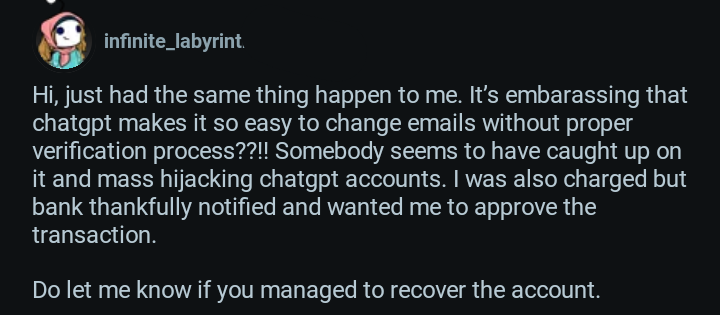
OpenAI’s published instructions for changing an account’s email address require access to the existing email inbox for the self-service process. Its guidance says that if you cannot access the current email address, you cannot use that standard self-service method to change it.
That creates a serious problem when an attacker changes the email address and the legitimate owner can no longer sign in.
In this situation, repeatedly trying the same login procedure may not resolve the underlying issue. You need to contact OpenAI through its official support channels and explain that you believe the account has been compromised.
Start with OpenAI’s official guide: How to change your email address.
If you receive a legitimate account-change notification in your original inbox, read it promptly and follow only the instructions on the official OpenAI website. Do not assume a particular reversal period applies unless the official instructions for your case confirm it.
Keep any relevant notifications and support correspondence. Record the email address previously associated with the account, the approximate time you lost access and the sign-in method you normally used.
Most importantly, do not create additional uncertainty by sending passwords, authentication codes or complete payment-card details to people claiming they can recover the account for you.
How to Report a Hijacked ChatGPT Account
OpenAI has a published procedure for users who see unrecognised activity or suspect that their accounts have been accessed by someone else.
Its guidance recommends changing the account password as soon as possible. It also states that changing the password logs out current sessions within 30 minutes. If you normally sign in through Google or Microsoft, OpenAI advises resetting the password for that provider instead.
However, there is an important limitation: these instructions assume you can still take the relevant account-security action. If the attacker has changed your email address and locked you out, you may not be able to complete the normal password-reset process.
In that case, report the suspected compromise through OpenAI’s official support process:
OpenAI’s instructions for unrecognised account activity
The guide directs users to the Unauthorized Activity webform and tells them to select “Report unauthorized activity involving my account.”
When contacting support, give a concise, factual account of what happened. Include the account email address, your normal sign-in method, when you lost access and any relevant billing details requested by official support.
Do not send your full payment-card number or share your password. Use official OpenAI channels rather than contact details supplied by an unsolicited message or an account-recovery stranger.
Submitting a report does not guarantee immediate recovery. Keep a record of the submission and any reference number or reply you receive.
What Should You Do Immediately After Suspecting an Account Takeover?
The order of your actions matters because a compromised computer, email account or browser session can put more than one service at risk.
1. Stop using the suspected device for sensitive account changes
If you have a credible reason to believe that your computer is infected, avoid using it to change passwords or access banking, email and other important accounts until you have addressed the device’s security.
Use a separate device you believe is clean to begin securing your accounts. If the incident involves your work computer, follow your organisation’s security-reporting process rather than attempting an unauthorised repair.
2. Secure your primary email account
Your email account may be the recovery route for multiple online services. If an attacker controls it, they may be able to interfere with password resets and security notifications.
From a trusted device, change its password to a unique one. Review available account-security activity, recovery details and signed-in devices. Sign out unfamiliar sessions where the service permits it, and enable multifactor authentication.
If you suspect that your email account itself has been compromised, use that provider’s official recovery and security instructions.
3. Secure other accounts that may be affected
Prioritise accounts that share a password with the compromised service, along with email, financial services, social media and work accounts.
Change reused passwords and review suspicious sign-ins or activity. Do not assume that every other account has been accessed, but do not ignore the possibility if the same device or credentials were involved.
4. Report the ChatGPT compromise
Use the official OpenAI unauthorized-activity process described above. If you cannot sign in, explain that the normal account-security controls are unavailable because you have lost access.
5. Check your billing and subscriptions
Look for unfamiliar charges, changes to your subscription or other activity you do not recognise. If a payment appears unauthorised, contact your bank or payment provider promptly and follow its dispute process.
Keep records of relevant transactions. Do not assume that an unfamiliar charge will automatically be refunded; OpenAI says unauthorised charges must be reviewed and validated.
6. Preserve useful evidence
Keep security alerts, suspicious emails, payment records, relevant timestamps and support correspondence. These details may help you explain the incident accurately.
If malware is suspected, record the security product’s detection name. Do not claim that a particular malware family caused the takeover unless there is evidence supporting that conclusion.
What Happens to a ChatGPT Subscription If You Lose the Account?
Losing access to the account and stopping future payments are two separate problems.
OpenAI’s subscription guidance says that if a subscription is billed directly by ChatGPT and you can no longer access the associated email address, you should contact OpenAI Support for help cancelling it. The instructions ask for information such as the account email address, the last four digits of the payment card and the date of the latest subscription payment. Do not send the complete card number.
If you subscribed through the Apple App Store or Google Play, the subscription is managed through the store account used for the purchase. You generally need to manage or cancel it through that store, rather than assuming that access to ChatGPT itself controls the billing.
Read the official instructions before taking action: How to cancel a ChatGPT subscription.
There is another distinction worth making. Blocking a payment or cancelling a payment mandate with your bank or payment provider may affect future collection attempts, but it is not the same as confirming that the subscription has been cancelled through the service that bills you.
My friend said he could not cancel his ChatGPT subscription because he had lost access to the account. He also said he removed a PhonePe AutoPay mandate. I have not independently checked the billing arrangement, and removing that mandate alone would not establish that his ChatGPT subscription had been cancelled.
If this happens to you, check which entity actually bills the subscription, contact the relevant provider and obtain confirmation of the cancellation or dispute outcome.
Can You Simply Create a New ChatGPT Account?
Creating another account may restore your ability to use ChatGPT, but it should not be treated as a complete solution to a compromised account.
OpenAI’s email-change guidance says that account history and workspaces do not transfer to a new account. Starting again may therefore leave you without access to the conversations, projects and other material associated with the original account.
A new account also does not resolve questions about possible data exposure, unauthorised billing or access to other accounts from the suspected compromised device.
If you decide to create a new account, first address the security of your device and recovery email, and continue following up on any unresolved compromise or billing issue involving the original account.
Does Enabling Two-Factor Authentication Prevent This?
The Multifactor authentication (MFA), sometimes called two-factor authentication (2FA), adds a layer of protection because signing in requires more than a password alone.
It is worth enabling where available, alongside a unique password and good email security. But MFA should not be treated as a guarantee that an account cannot be compromised.
OpenAI’s account-security guidance also makes an important point: enabling MFA does not automatically terminate existing sessions. If you suspect unauthorised access, follow the recommended account-security steps rather than assuming that turning on MFA has removed an intruder.
Read OpenAI’s account-security recommendations for its current guidance.
For the same reason, account security is not only about ChatGPT. Protecting the email address used to recover the account, keeping devices updated and responding quickly to suspicious activity are all part of reducing the risk.
What We Know—and What We Still Don’t Know
My friend’s account is a useful starting point for asking practical questions, but it is not enough to establish exactly how the incident happened or how frequently this type of takeover occurs.
Other users have also publicly described losing access to ChatGPT accounts after an email address was changed without their permission. These reports show that people are raising similar concerns, but posts on Reddit or community forums are individual accounts, not independently verified forensic investigations.
They do not, by themselves, prove that OpenAI suffered a platform-wide breach or that every affected account was compromised through the same technique.
There are several things I cannot currently confirm about my friend’s case:
- Whether the suspicious prompt installed malware.
- Whether the Windows Defender detection was connected to the account takeover.
- Whether session cookies or other authentication material were stolen.
- Whether the attacker read or copied any ChatGPT conversations or uploaded files.
- How the email address was changed and whether the original account can be recovered.
- Whether the reported support request ultimately resulted in recovery or a billing resolution.
Those are not minor details. They determine what can be said confidently about the incident.
If my friend receives a substantive response from OpenAI or obtains reliable evidence explaining what happened, that could help clarify the account-recovery and security questions. Until then, it would be misleading to fill those gaps with assumptions.
Everything You Should Understand
ChatGPT can become a place where people store more than casual questions. They may use it to work through business decisions, organise projects, analyse documents or develop ideas they are not ready to share elsewhere.
That makes losing control of an account more than a login inconvenience. It can create uncertainty about personal information, work materials, account recovery and recurring payments.
The most useful response is neither to assume the worst nor to dismiss the risk. Secure the device and email account, report the suspected takeover through official channels, check billing separately and distinguish confirmed facts from guesses about how the attacker got in.
My friend’s report prompted these questions, but the exact mechanism and final outcome remain unverified. That uncertainty is worth stating openly. It is also why account-security guidance should be practical, specific and based on what can actually be established.
Have you lost access to a ChatGPT account after an unexpected email change? If you are comfortable sharing your experience, tell us what happened and whether you were able to recover it. Do not post passwords, verification codes, private account details or payment information.



























Conversation (0)