


Yes — ChatGPT does get slower the more you use it in a single conversation. This is not your imagination, and it is not always a problem with your internet connection.
I have dealt with it personally, tracked it across different devices, and read through hundreds of user reports to understand exactly what is happening and why.
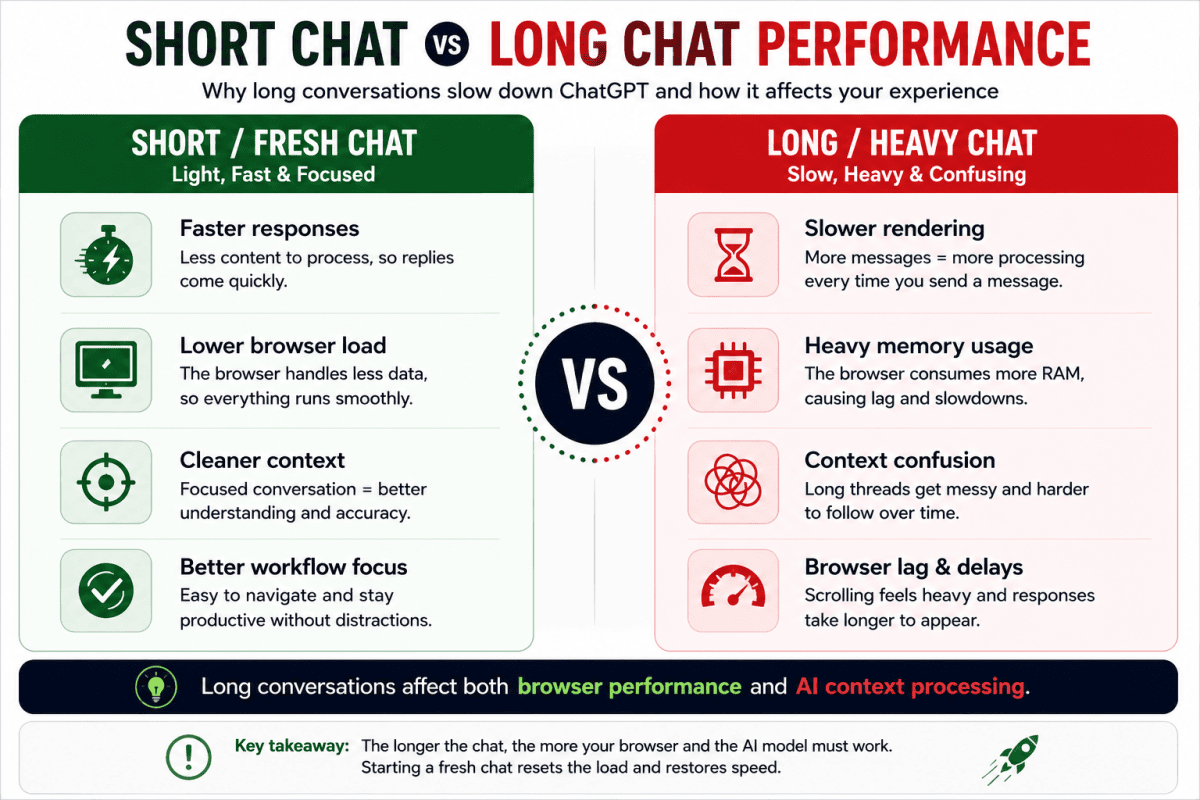
The short answer is this: the longer your chat gets, the heavier it becomes for your browser to handle. Every message you send and every response ChatGPT gives stays active in your browser memory.
As the thread grows, your browser has to recalculate and rerender the entire conversation with each new message. More messages means more processing, which means slower performance. Whether ChatGPT will get slower if you have too many chats in one thread is not a question of whether — it is a question of when.
Key Takeaway
Long ChatGPT conversations slow down because your browser and the AI model are both processing increasing amounts of context. The fastest fix is starting a fresh chat with a structured summary.
But there is a simple fix that most people do not know about. And once you understand why the slowdown happens, the fix makes complete sense and how ChatGPT plans affect users.
In this post I want to break the whole thing down properly. Not just the theory. What is actually happening technically, why long threads feel worse over time, what other users are saying, what mistakes to avoid, and the method I personally use to keep ChatGPT fast and responsive no matter how long a project runs. The complete guide to ChatGPT is here.
What Started the Discussion
I came across a Reddit post where someone argued that ChatGPT gets slower the longer you use it in a single session — and that the slowdown has nothing to do with OpenAI’s servers.
The person claimed that very long conversations become heavy in the browser because every message is being rendered, tracked, and managed in the interface. According to the post, once a chat gets large enough, performance starts dropping until the tab feels frustratingly slow.
That idea got significant attention because it matched what many people had already experienced firsthand. The comment section quickly filled with technical explanations, extension recommendations, shortcuts, and practical advice from everyday users who just wanted their chats to stop lagging.
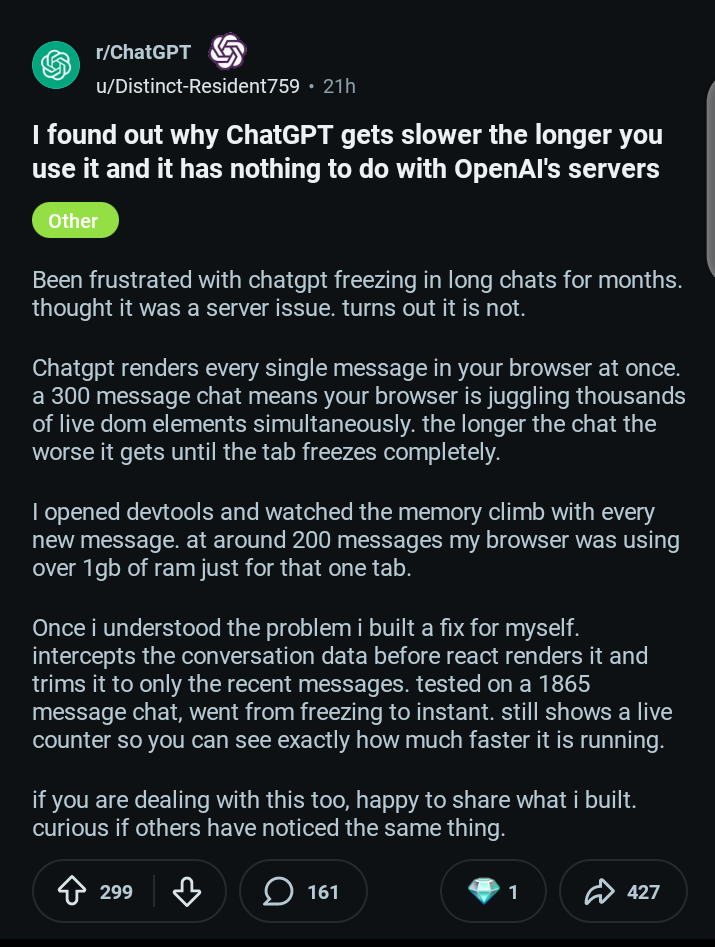
What caught my attention was not just the original claim. It was how immediately familiar the problem felt. I have had conversations that started perfectly fast and then slowly turned into a chore. Even when ChatGPT was still giving useful answers, the experience of the chat itself had already gone downhill significantly.
Why Does ChatGPT Get Slower the More You Use It?
This is the core question, and the answer has two distinct layers. Understanding both is what makes the fix actually make sense rather than feeling like a random workaround.
Layer One: The Browser Rendering Problem
Every time you send a message in an ongoing ChatGPT conversation, your browser does not just display the new response. It reloads and recalculates the layout for the entire conversation thread — every message from the very beginning, even the ones you scrolled past an hour ago. This is a documented issue with how the ChatGPT interface is currently designed.
Technical analysis from multiple sources in 2025 and 2026 identified the specific mechanism. The ChatGPT interface uses regular expression rules to identify links, style text, and format code blocks.
This regex processing runs on the entire visible thread with every new message, not just on the new content. As the thread grows longer, that processing load increases significantly.
Users with conversations reaching 150 to 200 messages report that browser-side memory leaks begin occurring — the page starts consuming increasing amounts of RAM, scrolling becomes sluggish, and response delivery slows noticeably.
This has nothing to do with GPT’s server performance or how powerful the AI model is on the backend. OpenAI’s servers may be responding perfectly quickly. The bottleneck is entirely in your browser rendering a conversation that has grown too large for the interface to handle efficiently.
Layer Two: The Context Window Load
There is a second, separate mechanism that also contributes to slowdown. Every time you send a new message in a long conversation, ChatGPT’s model must re-read your entire conversation history to maintain context and give a coherent response.
Every word in your chat counts as a token. As the context grows toward the limit of what the model can hold in its working memory, each new response takes longer to generate because there is significantly more previous text to process before generating anything new.
ChatGPT’s context window has grown dramatically in 2026, with GPT-5.4 supporting extremely large contexts. But the model still has to process that context with every response.
Longer prompts mean more tokens for the model to re-read, which means slower inference before the first word of the response even appears in your chat window.
If you have been thinking about switching to a tool with better context management, the full comparison of ChatGPT, Claude, and Gemini breaks down exactly how each one handles long conversations differently.
So when someone asks whether ChatGPT slows down when you have used it too much in a single session, the honest answer is yes — from both directions simultaneously.
The browser is struggling with the rendering load, and the model is processing an increasingly large context with every new message.
The Reality Check Most People Ignore
Most people who experience ChatGPT slowing down during a long conversation immediately blame the servers. Others blame their internet, their device, or the app itself.
The truth is that slowdown during a long conversation is almost always a combination of factors, and the most controllable factor — conversation length — is the one people are least aware of.
I have seen the same pattern show up consistently across different devices, different browsers, and different internet connections.
A fresh conversation starts fast. A conversation that has been running for an hour with dozens of messages feels noticeably heavier.
A conversation that has been running across an entire afternoon with complex back-and-forth exchanges can feel genuinely painful to use, regardless of connection speed.
That is why I do not give absolute statements like “this has nothing to do with the servers” or “this is only a browser problem.” Real usage is rarely that neat.
But what I do believe firmly is this: long chats create friction. Even when the model is still giving useful, accurate answers, the user experience often deteriorates as the thread grows. That is both a technical reality and a workflow problem — and both aspects need addressing.
Why the Conversation Gets Worse Over Time in Three Specific Ways
The Chat Interface Becomes Heavier
The longer the conversation, the more content your browser has to keep displaying and handling simultaneously.
This affects scrolling speed, page loading between messages, and overall responsiveness. Users with older devices or limited RAM notice this most severely, but even high-spec machines experience the effect after very long threads.
The Conversation Loses Focus
Extremely long threads often become structurally messy over time. You may have started asking about one thing, drifted into three related topics, switched direction entirely, and circled back.
At that point, even if ChatGPT still has access to the full context, the conversation no longer has a clean logical structure.
The AI’s responses can start reflecting that accumulated confusion in subtle ways — less precise, more hedged, occasionally contradictory with something said much earlier in the thread.
Your Own Workflow Gets Worse
This is the part most technical discussions of ChatGPT slowdown ignore completely. Long chats do not just slow the system down.
They slow the user down. You spend more time scrolling backward to find something relevant, trying to remember what direction you were heading, and deciding which of several branching threads of conversation to continue.
That cognitive overhead compounds across a long session and reduces the quality of the work you are producing, not just the speed of the tool you are using.
The same insight about AI working better with structured, intentional input rather than an endless undifferentiated thread shows up in the broader conversation about AI concepts most users need to understand.
Clean input produces cleaner output. This applies as much to conversation structure as it does to individual prompt quality.
What This Means Practically
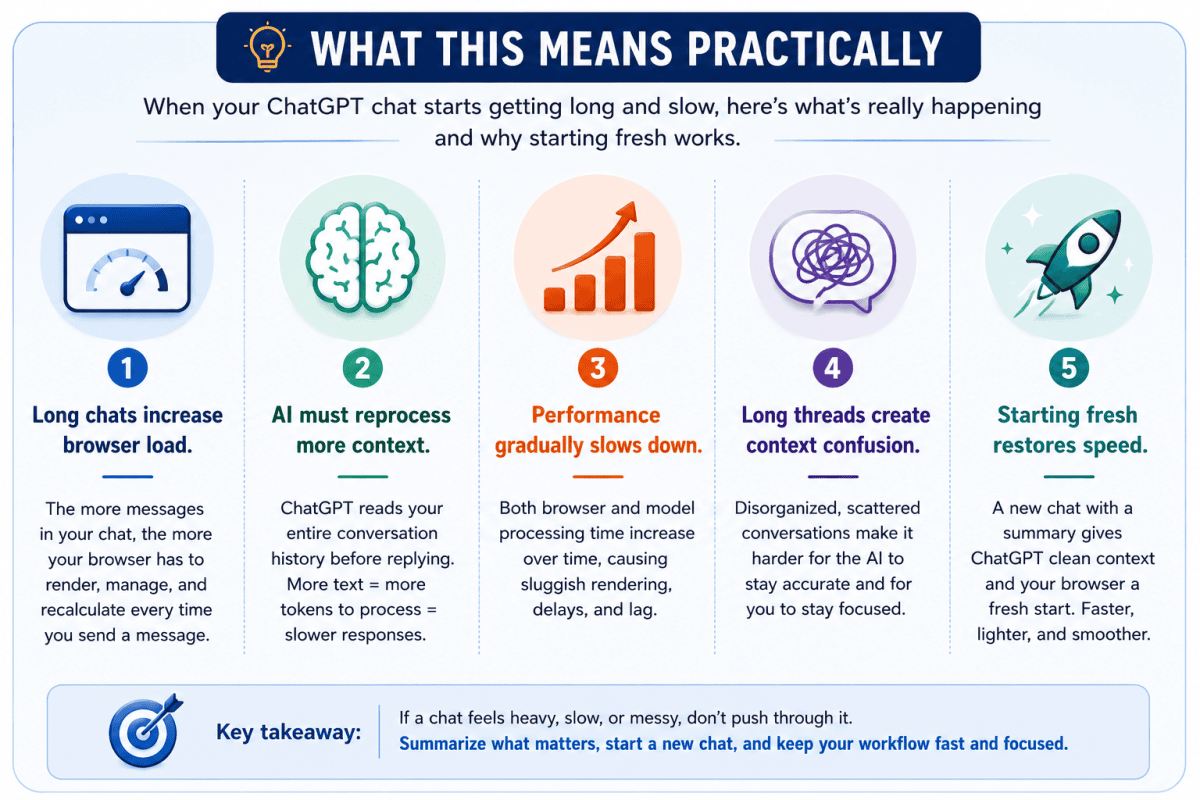
If your ChatGPT conversations start feeling slow, heavy, or disorganized, the issue is usually not just your internet connection.
Very long threads increase: • browser rendering load, • memory usage, • context processing time, • and workflow confusion.
The good news is that the fix is simple once you understand what causes the slowdown.”
Once you understand these two layers of slowdown, the solution becomes surprisingly simple.
The Simple Fix That Actually Works
When a conversation starts getting too long and ChatGPT begins to feel slow, I start a new chat. But I do not just abandon the old one blindly without carrying forward the context that matters.
Here is the specific method I use, and the reason it works better than most of the complicated alternatives people reach for first.
Step 1: Catch the Slowdown Early
Do not wait until the app is freezing badly. Once you notice the thread is getting sluggish — responses taking longer than usual, scrolling feeling heavy, the page feeling generally unresponsive — that is the signal to reset the workflow.
Acting earlier rather than later means you reset before context becomes fragmented and before the browser performance becomes genuinely disruptive.
Step 2: Ask ChatGPT for a Structured Summary
Before opening a new chat, ask the current conversation to summarize itself for continuation. The prompt I use is specific rather than vague. Something like:
“Summarize everything important in this chat so I can continue it in a new thread. Include key decisions, important context, the goals we are working toward, unfinished tasks, and the exact best next step.”
The reason for the specificity is that a vague summary request produces a vague summary. A structured prompt produces a summary you can actually paste into a new thread and pick up exactly where you left off.
If you want to understand the deeper workflow principles behind this, the guide on how to use ChatGPT effectively covers exactly how to structure your sessions for maximum output quality.
Step 3: Review the Summary Before Using It
This step matters more than most people give it credit for. Do not copy and paste the summary blindly. Read it. Check whether anything critical is missing.
If the summary skips something important, ask ChatGPT to add it before you move on. A slightly imperfect summary pasted into a new chat will generate slightly imperfect continuation responses — catching the gap here saves you from noticing it much later when it has already affected several subsequent messages.
Step 4: Open a Fresh Chat and Paste the Summary
Now open a new chat, paste the refined summary, and continue from there. The new thread starts clean, light, and fast. Your browser is no longer trying to render hundreds of previous messages.
ChatGPT’s model is starting with only the essential context rather than an entire heavy conversation history. Both problems — the browser rendering load and the context processing load — reset simultaneously.
Step 5: Keep the Old Chat as a Reference
Do not delete the original conversation immediately. Keep it as a reference point. If something important turns out to be missing from the summary, or if you need to go back and verify something that was discussed earlier, the old chat is still there.
Once you are confident the new thread has everything it needs, you can archive or ignore the old one without losing anything critical.
This method works across every type of ChatGPT work — writing projects, coding sessions, research, strategy planning, brainstorming, and content creation.
It does not require any extensions, any subscriptions, or any technical knowledge. It just requires the habit of managing your conversation as a workflow rather than treating it as a single infinite thread.
Why This Fix Works Better Than the Alternatives
The summary-and-restart method solves more than one problem at the same time, which is why it outperforms most of the other fixes people reach for.
First, it resets the browser rendering load completely. The new thread has zero accumulated messages at the start. Everything runs lighter and faster immediately.
Second, it resets the context processing load. ChatGPT is starting with only the essential summary rather than a full conversation history. Response generation begins faster because there is less to re-read before producing the next message.
Third, it forces a moment of intentional clarity. When you ask for a summary, you are effectively reviewing what has happened and what matters.
That review often surfaces things you had lost track of or clarifies the direction for the next phase of work. The act of summarizing improves the quality of what follows, not just the speed.
Fourth, it creates natural stage boundaries in longer projects. One chat for initial brainstorming. One for detailed planning. One for execution. And One for revision.
Working in deliberate stages produces better results than trying to do everything in a single sprawling conversation — and it keeps each stage fast and responsive throughout.
This same discipline around AI workflow is part of why some people get dramatically more useful output from the same tools.
The people who get the best results are rarely running everything in one place. Why most people fail with AI comes down to workflow and structure as much as it comes down to the tools themselves.
Many of those same people eventually switch tools entirely — which is exactly why so many people are switching from ChatGPT to Claude for work that requires longer, more complex sessions.
What People Are Saying About It
The Reddit discussion that originally prompted this post revealed something useful — people are not experiencing the slowdown in exactly the same way, which means the fix that works best is not identical for everyone.
Some users confirmed the browser rendering explanation strongly and said the slowdown was most severe when conversations included lots of formatted content, code blocks, and long structured responses.
These users reported that extensions designed to collapse or hide older parts of a conversation helped significantly. One user described a very large thread going from freezing behavior to instant performance after using a collapsing extension.
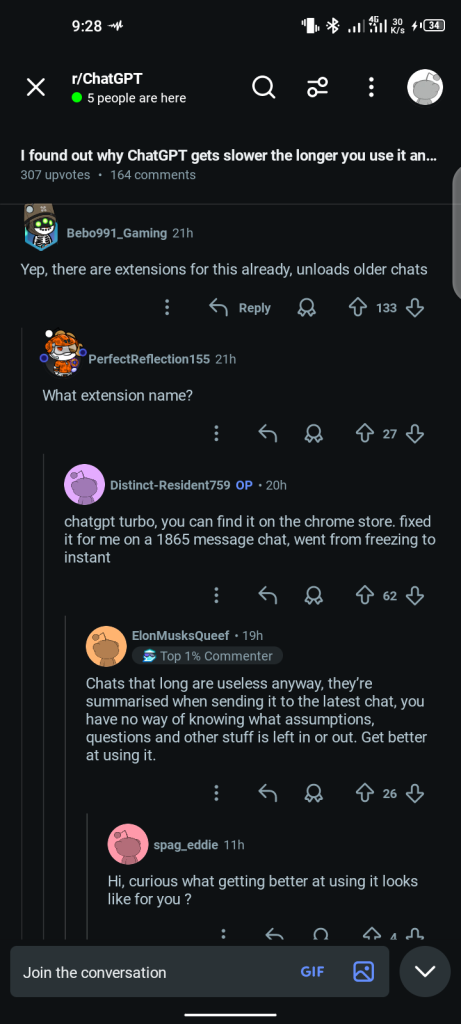
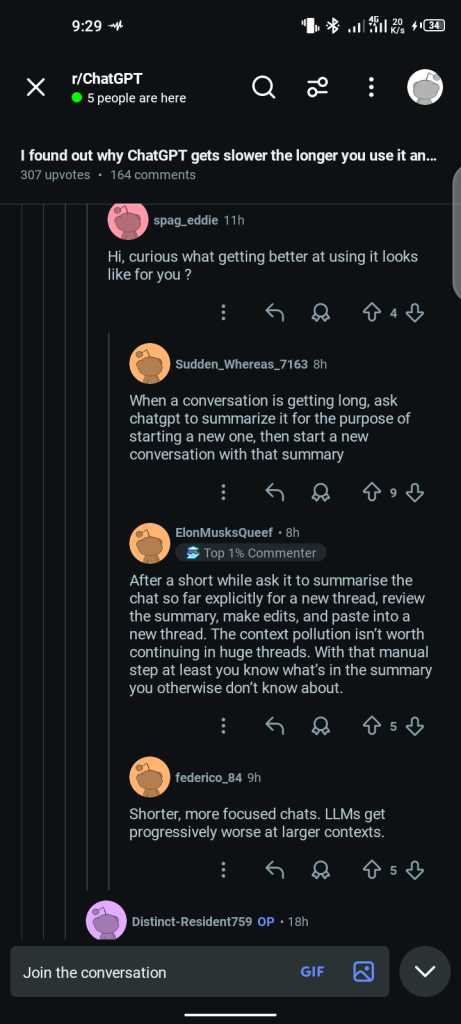
Others pushed back on the idea of long chats altogether. Their argument was that huge threads become too messy to manage properly, that summaries inevitably leave important things out, and that users are almost always better off working in shorter, focused sessions with clear purpose boundaries.
I find this argument compelling as a general principle, even if it is not always practical in the middle of a complex ongoing project.
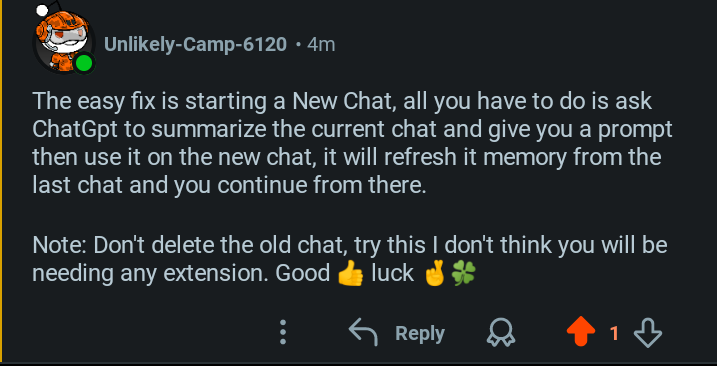
The most common practical recommendation in the thread — one that closely aligned with what I already do — was the summary method.
Ask ChatGPT to summarize the conversation for continuation purposes, review the summary, then open a fresh thread and paste it in.
Multiple experienced users had independently arrived at the same approach, which I take as a reasonable confirmation that it is genuinely the simplest effective solution for most people.
Other Fixes Worth Knowing About
Adjusting Response Rules Mid-Chat
One approach that some users find helpful before resorting to a full restart is giving ChatGPT explicit instructions to make its responses shorter and simpler.
Instructions like “from now on, always answer in two sentences or fewer unless I ask for more” or “stop using formatted lists and just give me direct answers” can reduce the amount of text being rendered with each response.
Since the slowdown is partly linked to the volume of text displayed, reducing output length can buy meaningful time before a fresh start becomes necessary.
Clearing Browser Cache and Cookies
OpenAI’s own official help documentation specifically identifies outdated cache data as one of the most common causes of unexpected ChatGPT slowdowns.
If your experience was running normally and then degraded suddenly rather than gradually over a long conversation, clearing your browser cache and cookies is the first official recommendation.
This is most relevant when the slowdown feels sudden and affects short conversations as well as long ones — which suggests the issue is not the conversation length but the browser state.
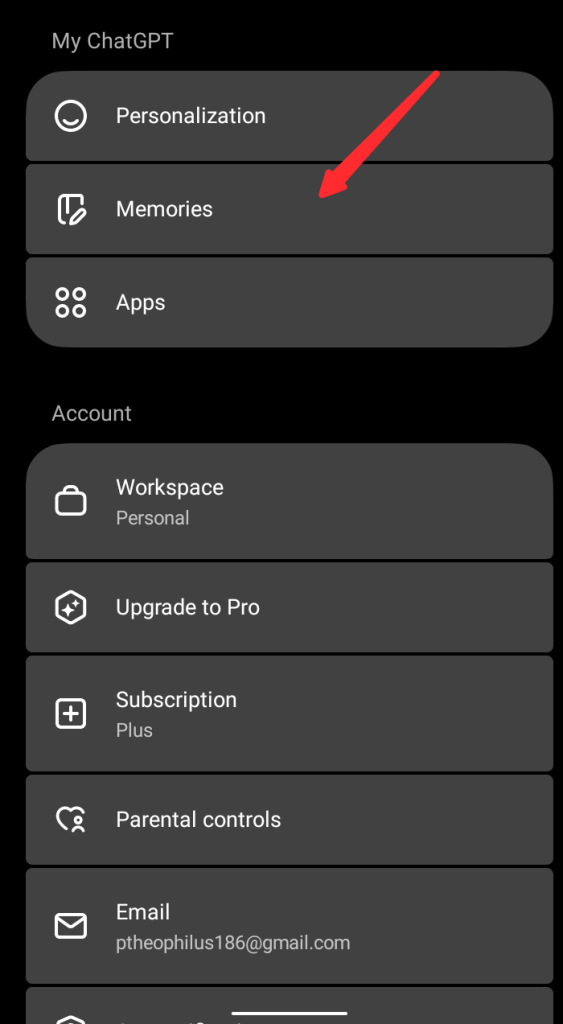
Managing Saved Memory
ChatGPT’s Memory feature — which saves facts and preferences across multiple conversations — has real limitations in 2026. The memory capacity is approximately 1,200 to 1,400 words total across all your conversations, not per conversation.
Many active users report this filling within a single day of heavy use. While managing saved memory is not the primary fix for a slow active thread, periodically reviewing and clearing outdated or irrelevant saved memories keeps the broader experience cleaner and avoids potential confusion in future conversations.
If you are considering whether to upgrade to a paid plan specifically for better memory and context handling, the ChatGPT Free vs Plus vs Pro breakdown covers exactly what each plan gives you.
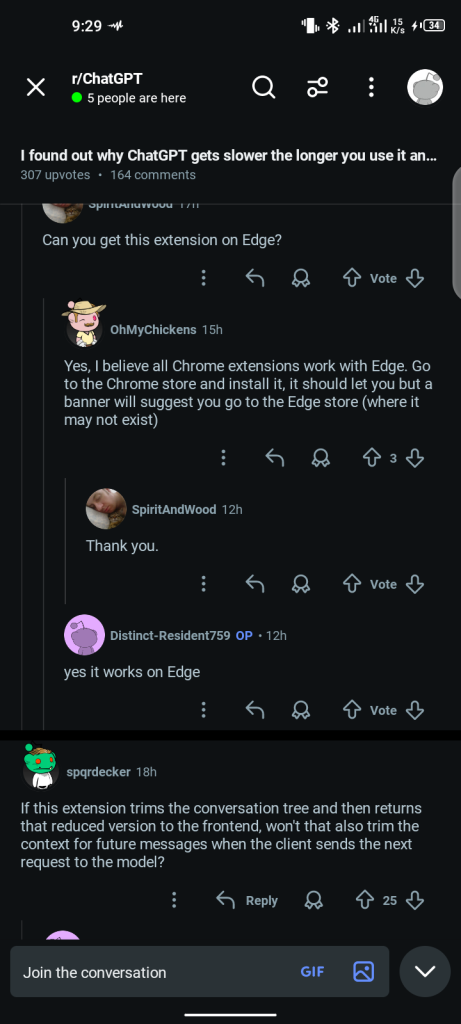
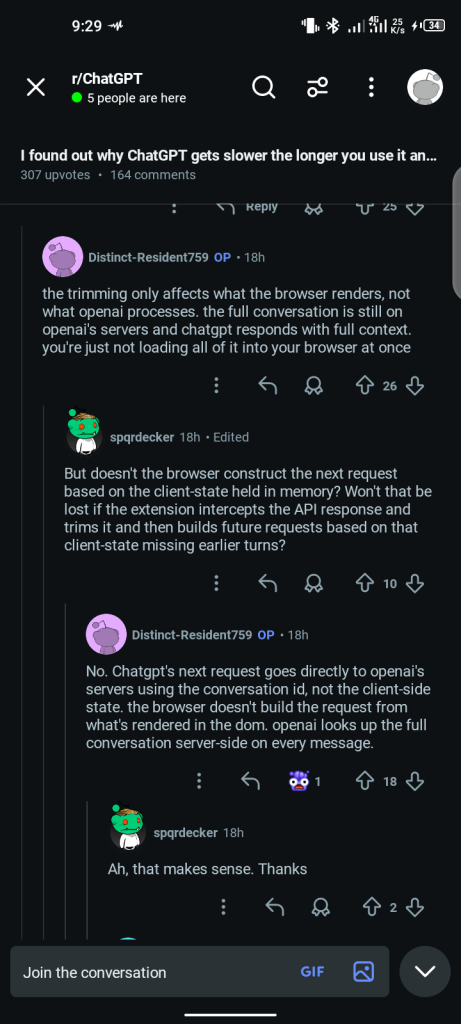
Using Browser Extensions Carefully
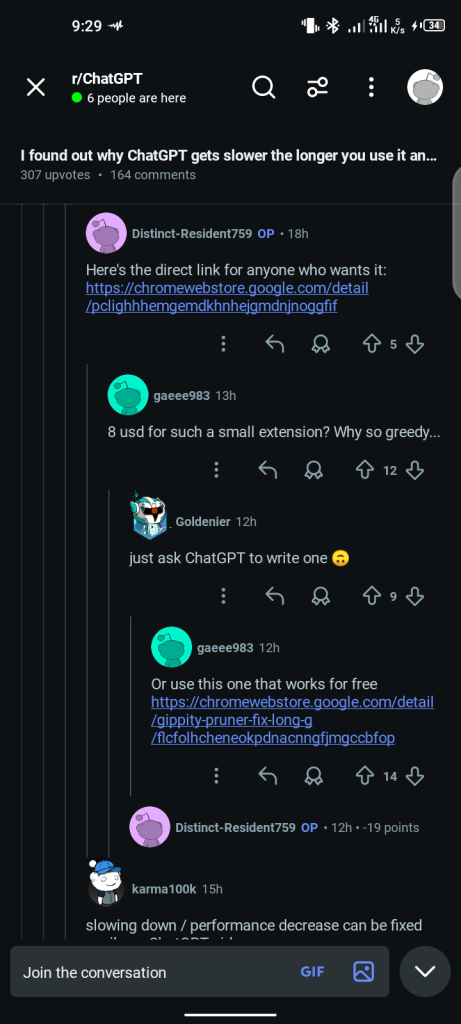
Several extensions exist that collapse or hide older parts of a ChatGPT conversation, reducing the browser rendering load without requiring you to start a new thread.
These can be effective for users who are technically confident and want to stay in a single long conversation.
The important caveat is privacy and trust. If your conversation contains sensitive information — business strategies, personal research, private client details — introducing a third-party browser extension into that environment deserves careful consideration before you install anything.
Extensions that require access to page content can theoretically access everything in your chat.
Closing Background Apps and Tabs
This recommendation sounds basic enough to dismiss, but it genuinely matters in practice. If your device is already carrying significant load from other applications or open browser tabs, even a moderately long ChatGPT conversation can feel worse than it should.
Closing unnecessary tabs, especially other memory-intensive applications, before or during a long ChatGPT session reduces competition for the RAM your browser needs to handle the conversation rendering efficiently.
Using ChatGPT During Off-Peak Hours
Server load genuinely does contribute to slowdown, even if it is not the primary cause in most long-conversation situations.
During peak North American business hours — roughly 9 AM to 5 PM EST — ChatGPT processes far more concurrent requests than at other times.
If your schedule allows flexibility, using the tool during early morning or late evening hours typically produces faster response times from the server side, which combines favorably with any local optimizations you have already made.
Mistakes That Make the Slowdown Worse
The first and most common mistake is waiting too long before resetting the thread. Once a chat starts feeling genuinely heavy, most users keep forcing it because they do not want to lose the conversation history.
The longer you wait past the point of noticeable slowdown, the worse the performance gets — and the larger and more complex the summary you will eventually need to carry forward.
The second mistake is copying a weak or incomplete summary into a new chat without reviewing it carefully. An incomplete summary produces an incomplete continuation.
The AI will proceed as if it has full context when it actually has a partial picture, and the gaps may not become obvious until several messages later when something important turns out to be missing or contradicted.
The third mistake is assuming one explanation covers every type of slowdown. If a brand new chat with just one message is running slowly, the issue is almost certainly server load, your internet connection, or your browser — not conversation length.
The fixes are different depending on which layer of the problem you are actually dealing with.
The fourth mistake is turning one conversation into a container for every unrelated thought and task. Starting a new chat on a separate topic, rather than adding it to an existing long thread, keeps every conversation focused, manageable, and fast throughout its lifetime.
The fifth mistake is installing browser extensions for ChatGPT without checking their permissions and reputation carefully. The convenience gain is rarely worth a privacy risk in conversations that contain sensitive work.
My Practical Routine When a Chat Starts Slowing Down
At this point in my daily use of ChatGPT, I have a routine that has become second nature.
If a chat is still short and focused, I keep going without changing anything. If it starts feeling crowded or responses start taking noticeably longer, I ask for a structured summary with a clear continuation prompt before anything becomes genuinely frustrating.
And If the summary is complete and accurate, I open a new thread and move forward there with the summary pasted at the start.
For projects I know in advance will be large — writing a detailed guide, working through a complex coding project, planning a multi-stage business strategy — I split the work into deliberate phases from the beginning rather than waiting for slowdown to force the issue.
One chat for initial exploration and idea generation. One for detailed planning and structure. One for execution and drafting. And One for editing and refinement. Each session stays fast throughout because none of them grows large enough to become heavy.
That approach gives me two advantages simultaneously. It keeps the tool responsive, and it keeps my own thinking sharper by forcing me to clarify what I need from each session before I start it.
The people who consistently get the best results from AI tools tend to work with more structure and intention, not just with better prompts.
That is one of the core reasons I keep returning to workflow and usage patterns in posts like AI tools that actually save you time and why people are switching from ChatGPT to Claude. Tool choice matters, but workflow matters at least as much.
The Bigger Insight Most Users Miss

The real lesson here goes beyond ChatGPT lag, and it is worth stating clearly.
Most people use AI like an endless notebook. They keep adding to the same thread indefinitely because it feels convenient — everything is in one place, the history is accessible, the context is preserved.
But convenience and efficiency are not always the same thing. Sometimes the smartest move is not to keep stretching one conversation. It is to restart with clarity, carrying forward only what genuinely matters.
Sometimes the smartest move is not continuing one endless conversation. It is restarting with clarity.
Once you start thinking about your AI conversations as deliberate stages rather than a single continuous thread, the slowdown issue stops being a mystery and becomes predictable and preventable.
You reset before the weight becomes a problem rather than after it has already disrupted your session. That shift in approach — from reactive to intentional — is what separates occasional ChatGPT users from people who use it effectively for serious, sustained work.
If you are curious how other AI tools handle long sessions differently, the complete Claude AI guide for beginners shows exactly how Claude manages context across extended conversations.
Frequently Asked Questions
Yes. The more messages accumulate in a single conversation, the heavier the thread becomes for your browser to render.
Your browser must reprocess the entire conversation with each new message, and this load increases consistently as the chat grows. Starting a new chat with a summary of the key context is the most effective fix.
It does within a single long conversation thread. Each new response requires ChatGPT’s model to re-read the full conversation history before generating a reply.
As that history grows, the processing time before the first word of each response increases. The browser rendering load also increases simultaneously. Both problems compound the longer you stay in one thread.
Good internet is only one variable in ChatGPT’s response speed.
The browser rendering load from a long thread, the model’s context processing time, and OpenAI server load during peak hours all contribute independently of your connection speed.
If a conversation has grown long and response times have slowed despite a strong connection, the conversation length is the most likely primary cause.
Yes, and there are two documented technical reasons. The browser has to rerender the entire visible thread with each new message — as more messages accumulate, this rendering work increases.
Simultaneously, the AI model must re-read more conversation history before generating each response, which increases the latency before the first word of each reply appears. Both effects grow progressively as the conversation length increases.
Yes, immediately and significantly. A fresh thread has zero accumulated rendering load. The browser starts clean. ChatGPT’s model starts with only the context you provide in the new conversation.
Both the browser-side and server-side contributors to slowdown reset at once. As long as you carry forward the essential context with a good summary, starting fresh is both the fastest and the simplest fix available without requiring any technical knowledge or additional tools.
No — at least not immediately. Keep the original conversation as a reference until the new thread is running smoothly and you are confident nothing important was lost in the summary.
Once you are satisfied that the continuation is complete and accurate, the old chat can be archived or left inactive without any consequence.
Managing saved memory can help keep your broader ChatGPT experience organized and prevent accumulated memory from creating confusion in future conversations.
However, for a specific long and currently slow active conversation, managing memory is not the most direct fix. Starting a new thread with a structured summary addresses the root cause more efficiently.
Memory management is better thought of as ongoing maintenance rather than a solution to active slowdown.
Claude, like ChatGPT, has a context window that represents the total amount of information it can actively hold and process in a single conversation.
When Claude warns that you have used 90 percent of your session limit, it means your conversation is approaching the maximum context it can maintain.
Responses may become less coherent or start losing earlier context as this limit is approached. Starting a new conversation with a summary of the key points is the recommended approach at this stage, just as it is with ChatGPT.
This is exactly the moment I documented in the NotebookLM and Claude app-building posts on this blog — it appeared during an intensive build session and is a normal feature of how AI context windows work, not a malfunction.
In Summary, This is What I Do
If ChatGPT starts dragging during a session, my approach is simple. I do not panic, I do not immediately assume something is broken, and I do not spend time troubleshooting things that are working fine. I look first at the conversation length.
If the thread has grown long and heavy, I ask for a clean summary, open a new chat, and continue with intention. That single habit has saved me more frustration than any extension, setting, or workaround I have come across — and for the vast majority of users who experience this issue, it is the simplest fix that genuinely works.






















Join the discussion Tap to open the comment form +