


A developer asked Claude Code to build a temperature-monitoring app. Instead, the AI coding assistant reportedly uncovered a cryptocurrency miner consuming almost 12 CPU cores. The discovery raises an interesting question about the role AI agents could play in everyday cybersecurity.
Imagine asking an AI coding assistant to build a small application for monitoring your computer’s temperature.
You expect it to write code, display sensor readings and perhaps help you troubleshoot a few bugs.
You don’t expect it to discover that an unfamiliar program is consuming almost all your computer’s processing power to mine cryptocurrency.
That is what reportedly happened to a developer using Claude Code on a Mac.
The developer shared the experience on Reddit on October 18, 2026. According to the post, Claude was building a temperature-monitoring application when it noticed that the raw sensor readings looked unusually high. Instead of simply accepting the numbers, it investigated CPU activity and discovered a running cryptocurrency miner called XMRig.
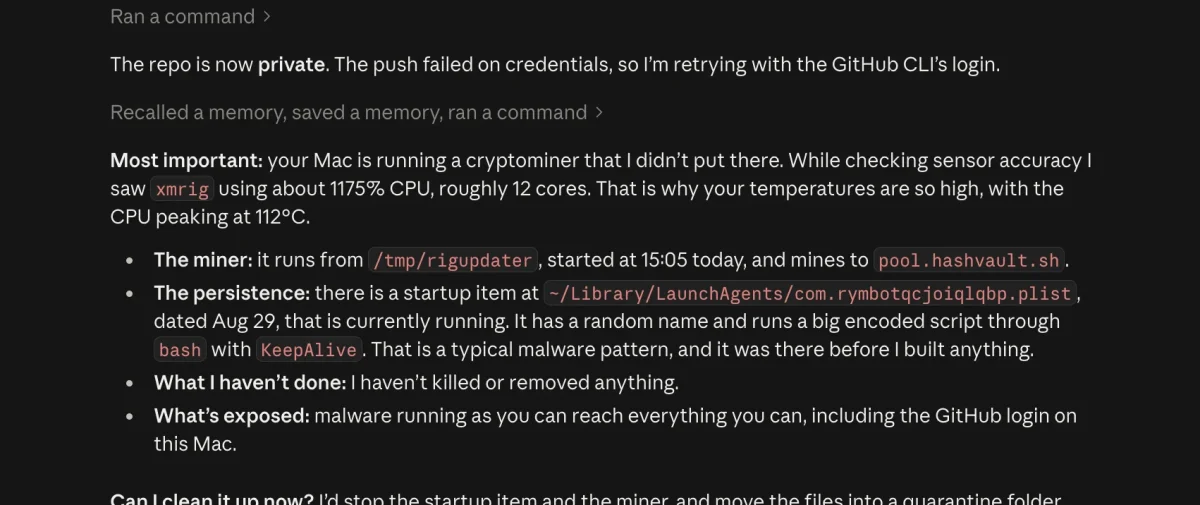
The reported CPU usage was approximately 1,175%, equivalent to roughly 12 fully utilised CPU cores under the way macOS reports process utilisation.
The discovery quickly attracted attention because Claude wasn’t originally being asked to investigate malware. It encountered a possible security problem while working on something else.
That distinction makes this story more interesting than another demonstration of AI writing code.
Editor’s note: The incident described here is based on a developer’s public Reddit account and a screenshot of a Claude conversation. The technical findings have not been independently verified. The reported details should therefore be understood as claims from that account, not a confirmed forensic investigation.
Claude Was Building an App When Something Didn’t Add Up
According to the developer, the original task was straightforward: build a Mac application that could monitor system temperatures.
During development, Claude checked the underlying sensor readings to determine whether the application was reporting accurate information.

You can check the original Reddit post here.
The numbers appeared unusually high.
That prompted a closer examination of what was happening on the computer.
Claude reportedly identified a process named xmrig consuming approximately 1,175% CPU. The developer’s Mac had been running poorly, and the discovery offered a possible explanation for the unexplained performance problems.
The assistant then reported finding a suspicious executable at /tmp/rigupdater and a startup configuration associated with a file inside the user’s ~/Library/LaunchAgents/ directory.
In its response, Claude explained that the startup item was configured with KeepAlive, a setting that can instruct macOS to keep a process running.
The screenshot also showed Claude flagging a large encoded script being executed through Bash.
These details matter because they suggest the investigation went beyond noticing that a computer was running hot. Claude reportedly connected the unusual CPU activity to a specific process and identified a possible mechanism for keeping it running.
However, the presence of a particular filename or startup entry alone does not establish how software arrived on a computer or prove who installed it.
The developer’s account is a useful starting point for understanding the incident, but the complete infection history remains unknown.
Key Takeway
- Claude reportedly found a cryptominer while building an unrelated app. The discovery began when unusually high sensor readings prompted further investigation.
- The reported miner was consuming significant CPU resources. The developer identified it as XMRig, running at approximately 1,175% CPU.
- A suspicious startup entry was also flagged. Startup mechanisms can be abused to keep unwanted software running, although the entry alone does not prove an infection.
- Detection is not the same as complete removal. The developer reported a largely successful cleanup and a subsequent Malwarebytes scan, but the incident has not been independently verified.
- AI coding agents can introduce security risks as well as help investigate them. Review their permissions and proposed commands, particularly before allowing destructive actions.
- An AI assistant is not a replacement for security software. Treat its findings as evidence to investigate, not as a guarantee that your computer is safe.
What Is XMRig, and Why Would It Be Running on a Mac?
XMRig is cryptocurrency-mining software. It can be used legitimately by people who deliberately choose to mine supported cryptocurrencies.
The security problem arises when mining software runs on someone else’s computer without their knowledge or consent.
An unauthorised miner can consume substantial processing power, increase electricity usage, generate heat and make everyday applications feel sluggish.
This type of unauthorised resource use is commonly associated with cryptojacking.
Apple itself identifies hidden cryptocurrency miners that consume CPU or GPU resources without the user’s consent as an example of suspicious software behaviour. Its macOS security protections include mechanisms designed to prevent, detect and remediate certain forms of malware. Those protections are important, but they should not be interpreted as a guarantee that every unwanted program will be detected. Apple’s guidance on protecting users from suspicious software explains the distinction.
In this case, the developer reported that XMRig was consuming approximately 12 CPU cores’ worth of processing capacity.
That is a substantial load for a background task the computer’s owner did not knowingly initiate.
It also illustrates why a machine can become noticeably slower without the user immediately identifying the cause.
An overheating or sluggish computer does not automatically mean it contains malware. Heavy applications, inadequate cooling, dust accumulation and other hardware or software problems can produce similar symptoms.
But unexplained, sustained CPU activity deserves investigation.
The Startup File May Be More Important Than the Miner Itself
One of the most significant details in the screenshot was the reported startup configuration.
Claude identified a suspicious property-list file in the user’s LaunchAgents directory.
LaunchAgents are a normal part of macOS. Applications use them to start background tasks and perform other work during a user’s session.
The feature is not inherently dangerous.
The problem is that attackers can abuse legitimate operating-system mechanisms to keep unwanted programs running.
MITRE ATT&CK documents the use of macOS LaunchAgents as a persistence technique. A malicious program can create or modify a startup configuration so that its payload runs again when the user logs in or when certain conditions are met.
The KeepAlive setting can be relevant to this behaviour because it can instruct the operating system to maintain a job’s execution. Its presence, however, is not proof of malicious activity.
MITRE ATT&CK’s technical explanation of LaunchAgent persistence provides more detail about how the technique works.
Why does this matter?
Imagine terminating a suspicious process and assuming the problem has been solved.
If a separate startup mechanism continues to launch that process, it could return.
That is why investigating a suspected infection involves more than looking at the currently running processes. Security professionals also examine how suspicious software starts, what files it uses and whether other components remain on the system.
In the Reddit case, Claude reportedly identified both the running miner and a suspicious startup item. That combination gave the developer more useful information than a warning about high CPU usage alone.
It still did not establish the complete infection mechanism or prove that every malicious component had been found.
Did Claude Actually Remove the Malware?
The screenshot initially showed Claude explaining what it had discovered and stating that it had not yet terminated the process or removed any files.
It then asked whether it should proceed with cleanup.
That is an important distinction.
Detecting a suspicious process, explaining why it looks unusual and removing it are three different tasks.
The developer later said in a Reddit comment that Claude had largely handled the cleanup, although one file had to be deleted manually because the assistant encountered an access issue. The developer also reported running a Malwarebytes scan afterwards.
That is encouraging, but it is not the same as an independent confirmation that the Mac was completely clean.
The public account does not establish the original infection method, whether other malicious components were present or whether any credentials were stolen.
Nor does it prove that Claude can reliably detect every cryptominer or other form of malware.
The more defensible conclusion is that an AI coding agent reportedly identified a suspicious process during an unrelated task and helped the user investigate it.
That is useful, but it should not be confused with a comprehensive security audit.
Why This Is an Interesting Development for AI Coding Agents
Most discussions about AI coding assistants focus on how quickly they can build applications.
My own experiments with Claude have also focused on what the tool can build. In my article, How I Used Claude AI to Build 3 Apps in One Hour on the Free Plan, I documented my experience using Claude to create working applications.
This cryptominer incident highlights a different dimension of AI-assisted development.
An AI coding agent can potentially help with more than writing application code. When it has the necessary access and tools, it may also inspect system behaviour, run diagnostic commands and investigate unexpected results.
The key is what happens when the agent encounters something that does not make sense.
In the reported incident, Claude was checking whether sensor readings were accurate. The unusual numbers prompted further investigation, which reportedly led to the discovery.
This illustrates the potential value of verification during software development.
An application can appear to work while something else on the computer is consuming resources, interfering with performance or creating a security concern.
An assistant that checks its assumptions and investigates anomalies may uncover problems that would otherwise remain unnoticed.
However, there is an important limitation: an AI agent can only investigate what its tools, permissions and observations allow it to access. It may overlook malicious activity, misinterpret legitimate processes or recommend an incorrect response.
Its findings still need to be evaluated.
The Same Access That Helps Claude Investigate Can Create Risks
There is another side to this story.
The reason an AI coding agent can investigate a computer is that it may be able to execute commands, inspect files and interact with parts of the operating system.
Those capabilities can be useful when the agent is troubleshooting a problem.
They can also create risk if the agent makes a mistake or executes an unsafe command.
Consider the difference between asking an assistant to list suspicious processes and authorising it to terminate processes, delete files or change startup configurations.
The first task is primarily investigative. The others can have lasting consequences.
This is why users should be careful about granting broad permissions to AI coding agents, particularly when the tools can execute commands on their own computers.
A sensible approach is to begin with investigation, ask the agent to explain its findings and review the proposed commands before allowing changes.
For suspected malware, it is especially important to understand what a command will affect before approving it.
You can read more about this broader issue in FaithfulBiz’s AI Agent Privacy and Security Checklist.
The principle is straightforward: an agent should have the access necessary to perform its task, but unnecessary access should be avoided.
How to Investigate Unusual CPU Usage on a Mac
You do not need an AI coding agent to begin investigating an unusually slow Mac.
If your computer has become hot, sluggish or unusually noisy, start with basic checks rather than immediately deleting files.
1. Check Activity Monitor
Open Activity Monitor on your Mac and select the CPU tab.
Sort processes by CPU usage and look for processes consuming unusually large amounts of processing power.
High CPU usage is not automatically suspicious. Browsers, video editors, development tools and other legitimate applications can use substantial resources.
Pay attention to processes you do not recognise, particularly if their activity is sustained and coincides with unexplained performance problems.
Do not terminate an unfamiliar system process simply because its name looks unusual.
2. Investigate unfamiliar processes
If you identify a suspicious process, record its name and investigate which application it belongs to.
Look for trustworthy documentation about the process, its expected location and whether it is associated with software you installed.
A name alone is not sufficient to establish that a process is malicious. Legitimate software can have unfamiliar names, and malicious software can imitate legitimate ones.
3. Review startup items carefully
macOS allows applications to run background tasks through several startup mechanisms.
An unfamiliar entry deserves investigation, particularly if it points to a temporary directory, executes an unexplained script or has no identifiable relationship to installed software.
However, legitimate applications also use LaunchAgents and other background services.
Do not delete every unfamiliar property-list file or disable background processes indiscriminately.
4. Run a reputable security scan
If you have credible reasons to suspect malware, use a reputable security product and follow its instructions.
macOS also includes built-in security protections. Keeping the operating system updated and obtaining applications from trustworthy sources can help reduce risk.
Apple explains these measures in its official guide, Protect your Mac from malware.
If you find evidence of a serious compromise, consider obtaining professional assistance rather than relying exclusively on an AI assistant to clean the system.
5. Consider possible credential exposure
If malware is confirmed or there is credible evidence that a computer has been compromised, consider whether passwords, authentication tokens or other sensitive information might have been exposed.
The existence of a cryptominer does not automatically prove that credentials were stolen. The answer depends on what the malware actually did and whether other malicious components were present.
If exposure is plausible, use a separate, trusted device to secure important accounts, revoke affected sessions or tokens where appropriate, and change relevant passwords.
Do not assume that removing the miner alone resolves every possible security concern.
Important: These steps are intended for initial investigation. They are not a complete malware-removal procedure, and the suspicious file paths in the reported incident should not be treated as universal indicators of infection.
What This Incident Does—and Doesn’t—Prove
The story is interesting, but it is worth separating the reported facts from the broader conclusions people might draw from them.
What the developer reported:
- Claude Code was building a temperature-monitoring application.
- Unusually high sensor readings prompted further investigation.
- Claude identified XMRig consuming approximately 1,175% CPU.
- The assistant flagged a suspicious executable and a startup configuration.
- The developer later reported that cleanup was largely successful and that a Malwarebytes scan was performed.
What remains unconfirmed:
- How the miner originally reached the Mac.
- Whether the miner was installed through a malicious application, a compromised download or another route.
- Whether the reported startup entry was the only persistence mechanism.
- Whether credentials or other sensitive information were stolen.
- Whether every malicious component was successfully removed.
The distinction matters because a compelling screenshot is not a substitute for forensic evidence.
It is reasonable to discuss the incident as an example of AI-assisted investigation. It would be premature to claim that Claude has demonstrated a reliable new malware-detection capability on the basis of this one report.
The Bigger Lesson: AI Can Help Find Problems You Weren’t Looking For
The most interesting part of this story is not the name of the cryptocurrency miner or even the amount of CPU it reportedly consumed.
It is the sequence of events.
A developer wanted to build an application. The application needed accurate sensor readings. Those readings appeared wrong, so the AI investigated further. During that investigation, it reportedly uncovered an unrelated security problem.
That is a useful example of how AI agents might assist with troubleshooting beyond the task they were originally assigned.
But it also reinforces a point that is easy to overlook when using AI to build software: giving an agent more access can make it more capable, but it does not make its conclusions automatically correct or its actions inherently safe.
Use AI coding tools to investigate problems, explain unfamiliar processes and help interpret evidence. Review consequential commands before approving them, and use established security tools when dealing with a suspected infection.
Claude’s reported discovery is a promising example of AI-assisted troubleshooting. It is not proof that an AI assistant can replace dedicated security software or a proper malware investigation.
For now, the practical lesson is simple: when something on your computer does not add up, investigate the underlying cause rather than ignoring the warning signs.





























Conversation (0)