
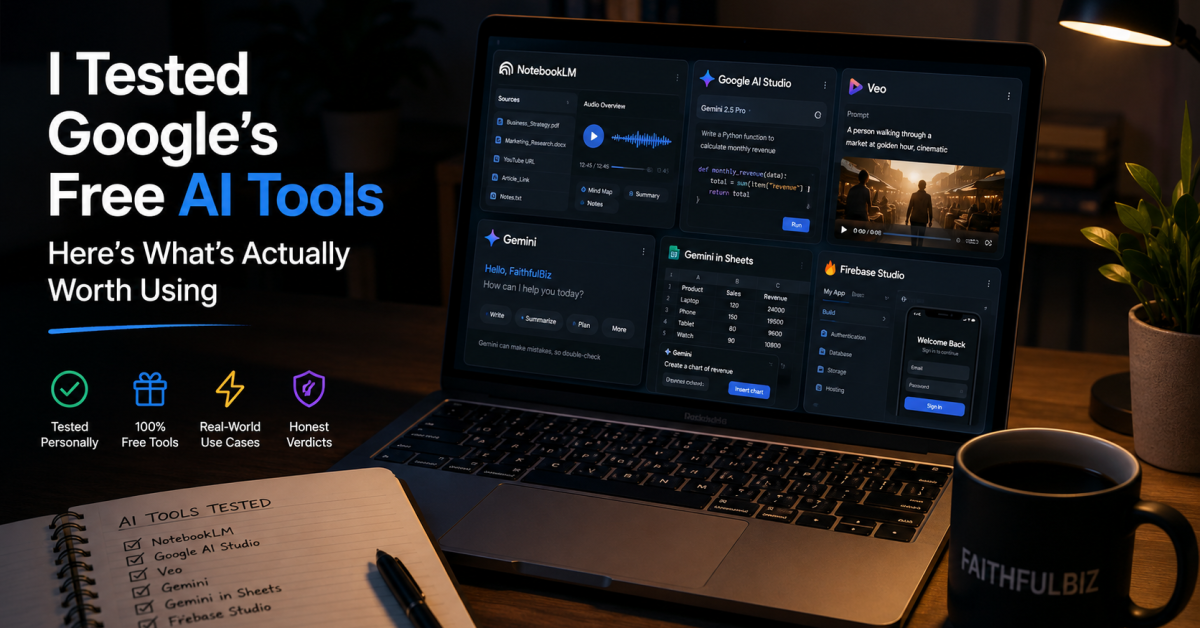
A few days ago I came across a post on Facebook. It was an infographic listing twelve free Google AI tools — Veo 3, NotebookLM, Gemini Live, Firebase Studio, Google AI Studio, and several others. The caption promised these tools would help you “finish projects 3x faster.”
My first reaction was scepticism. Not because the tools are not real — they are — but because I have seen enough “free AI tools” lists to know that “free” in this context usually means free for five minutes before a paywall appears, or free only if you live in the United States and have already signed up for three other Google products.
So I did what I always do when something feels too clean to be completely true. I sat down and tested each tool properly. Not a quick scroll through the interface and a screenshot. Actually using them for the kinds of tasks that matter — writing, research, content creation, building, video generation — to find out which ones delivered on the promise and which ones were more complicated than the infographic suggested.
This post is what I found. The honest version, not the viral version. These are the best free Google AI tools that are actually worth your time in 2026 — and the ones that are more nuanced than a single slide can convey.
Before We Start: What “Free” Actually Means Here

Here is something the infographic did not cover, and it matters before you open a single tab.
Google has built a sprawling AI ecosystem. Some tools in that ecosystem are genuinely free with no strings attached — you sign in with a Google account you already have and start using them immediately. While some are free only for the first few uses before billing begins. And some require a Google Cloud account with a payment method on file, even if they do not charge you immediately. And some are technically accessible for free but designed primarily for developers, which means the interface will feel confusing if you just want to get a task done.
I will be clear about which category each tool falls into as we go through them. That clarity is the most useful thing I can give you, because the difference between “genuinely free” and “free tier that requires a credit card to access” is the difference between a tool you can start using today and a tool that will frustrate you before you even see what it does.
With that said, several of these tools are genuinely impressive at zero cost. Let us start with those.
The Tools That Genuinely Impressed Me
NotebookLM — The Most Underrated Tool on the Entire List
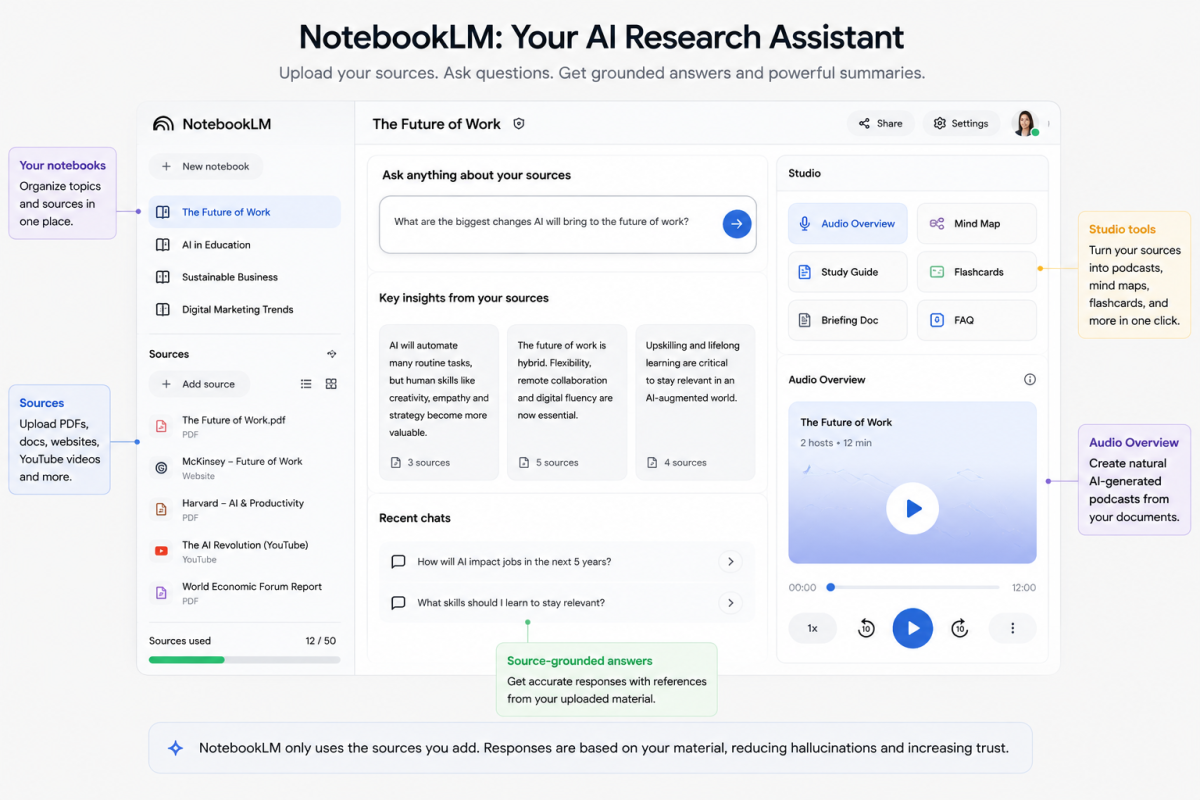
I have already written a full guide on NotebookLM because it deserves more than a paragraph. But in the context of this comparison, it is the tool that most consistently surprised me across every type of task I threw at it.
The core idea is simple. You upload your own sources — documents, PDFs, websites, YouTube videos — and NotebookLM creates an AI workspace grounded in that material. This significantly reduces hallucinations because the responses are based on the sources you provide instead of random general internet noise. It is still important to verify important answers, but the source-grounded structure makes the tool much easier to trust than a normal open-ended chatbot.
What makes it stand out
What makes it stand out from every other tool on this list is the Studio tab. One click on Audio Overview and your uploaded document becomes a podcast-style discussion between two AI hosts who sound genuinely human — complete with natural pauses, follow-up questions, and banter. I uploaded one of my own blog posts and listened to a twelve-minute conversation about it while I made tea. The hosts correctly identified every major argument, cited the right data points, and even picked up on a nuanced conclusion I was not sure would translate into audio format.
Beyond audio, the Studio tab generates mind maps, flashcards, quizzes, slide decks, video overviews, infographics, and structured reports — all from the same source. For students, researchers, bloggers, and content creators, this single tool removes more friction from the research and learning process than almost anything else I tested.
It is currently free to start using with a Google account. No credit card. No trial period. You can upload multiple source types and build notebooks around your own material. Access it through NotebookLM. If you want to go deeper on exactly how to use every feature, this complete NotebookLM beginner’s guide covers the full walkthrough with real screenshots.
Verdict: Use this. Today. It is one of the best free AI research tools available right now.
Google AI Studio — Genuinely Free and More Powerful Than It Looks
Google AI Studio sits at an interesting intersection. It was built for developers, but it is accessible to anyone comfortable with a web interface and curious enough to explore what Google’s underlying models can actually do.
The browser interface at Google AI Studio remains free to use with no credit card required for basic experimentation. What you get is direct access to Google’s Gemini models in a playground where you can test prompts, experiment with different model configurations, and generate text, images, and code in a single environment.
Google AI Studio also gives creators and developers a practical way to test AI workflows before turning them into real tools or apps. That makes it especially useful if you are trying to understand how AI models behave beyond normal chatbot conversations. If you are still learning the fundamentals, this guide on AI concepts you must understand will help you make sense of the bigger picture.
The free tier does have real limits worth knowing. API usage has quotas, and heavy use can push you into paid billing territory depending on what you are building. For learning, prototyping, testing prompts, and personal projects, the free browser experience is more than enough. The main difference between free exploration and paid usage is usually scale, throughput, and privacy controls, not simply whether the tool works.
One important caveat: on the free tier, your inputs and outputs may be used by Google to improve its models. If you are working with sensitive client data or confidential business information, a paid or enterprise-level setup is worth considering for that reason specifically.
Verdict: Worth using, especially if you want to test what Google’s models can do or prototype simple AI workflows without writing code.
Veo3.1 via Google Vids — AI Video Generation Is Becoming More Accessible

This one surprised me more than any other tool on the list, because AI video access is changing quickly.
Veo launched as one of Google’s most advanced AI video generation models, and early access was mainly tied to premium plans and limited availability. That made the infographic’s simple “free” framing too neat for the full reality. The technology is impressive — generating video from text prompts with increasingly strong visual quality — but access, limits, and availability can change depending on region, account type, and Google’s current rollout.
Google has begun rolling out limited free access to AI video creation through tools such as Google Vids and related AI video experiences. In practice, this means some users can test short AI-generated video clips without immediately paying for a premium subscription. The exact limits may vary, and free exports may include restrictions such as lower resolution, watermarks, or monthly generation caps.
I tested this properly:
The output quality for a free or limited-access tier is impressive. I typed a description of a simple scene — a person walking through a market at golden hour, mid-shot, warm colour grading — and what came back looked much closer to usable B-roll than I expected from a beginner-friendly AI tool. The most important thing to understand is that AI video is still not unlimited, even when access is free to start.
For testing the technology, producing occasional social content, or creating a short product demo, limited free access is meaningful. But if you are planning to produce AI videos every day, you should expect limits, upgrade prompts, or usage restrictions eventually. For creators testing AI video seriously, this is still worth exploring.
Verdict: Worth testing if AI video matters to your workflow, but treat the free access as limited rather than unlimited.
Gemini — More Useful Than Most People Realise on the Free Tier
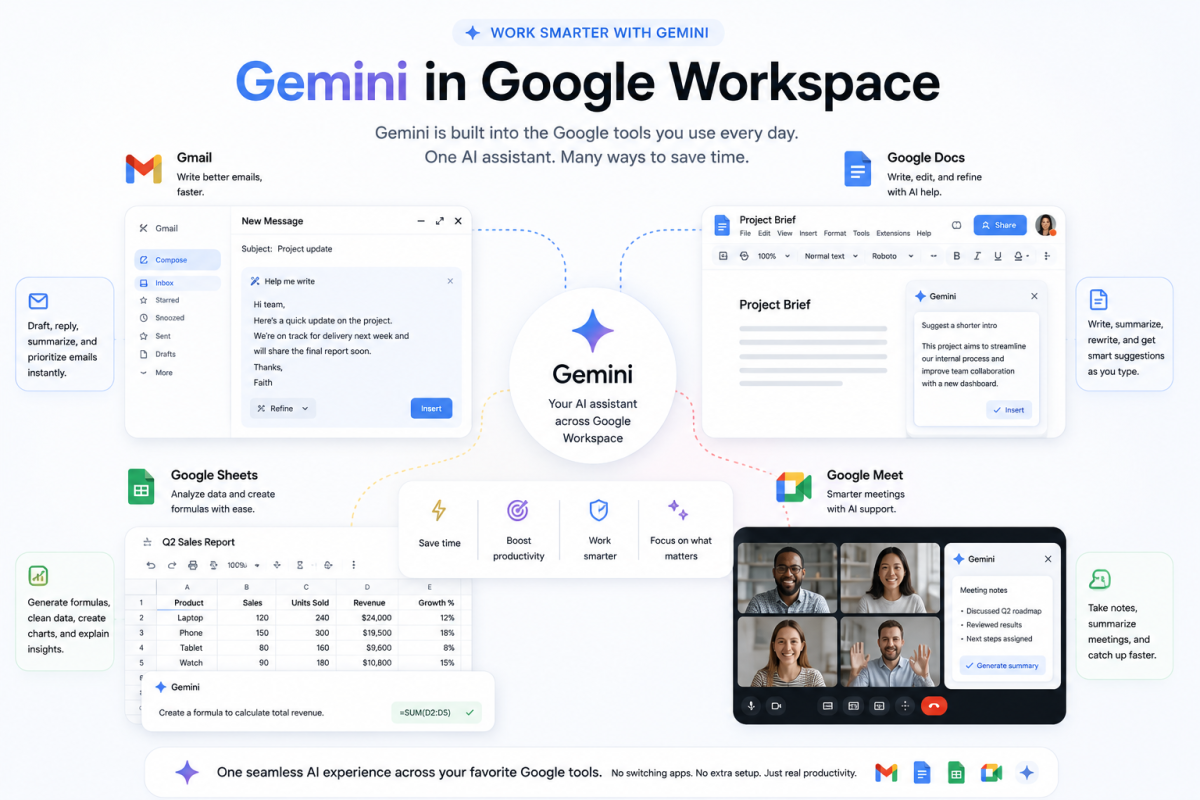
Gemini gets overshadowed in most AI conversations because ChatGPT and Claude attract more coverage. But the free tier of Gemini at Gemini is genuinely competitive for everyday tasks — and it has one integration advantage that neither ChatGPT nor Claude can fully match.
Because Gemini is built into Google’s ecosystem, it works across many Google products and services in ways that feel natural if you already use Gmail, Google Docs, Google Sheets, Google Meet, or Google Search. If you already use Google’s tools for any part of your work, Gemini often feels less like a separate app and more like an AI layer inside your normal workflow.
On the free tier specifically, Gemini handles writing assistance, summarisation, translation, coding help, and general research tasks well. It is not always the strongest model for deeply nuanced long-form writing — I still prefer Claude for that — but for quick, functional daily tasks inside tools you already have open, it is consistently useful. The comparison between Claude and ChatGPT covers where different AI assistants genuinely win, and Gemini’s integration story is its clearest competitive advantage.
Verdict: Worth using specifically for its Google ecosystem integration. Less compelling as a standalone AI assistant compared to Claude or ChatGPT free tiers.
The Tools That Are Useful — But More Complicated Than Advertised
Gems in Gemini — Custom AI Assistants That Need Setup to Deliver
Gems is Google’s version of custom AI assistants — the equivalent of ChatGPT’s custom GPTs. You build a Gem by giving it a specific persona, instructions, a knowledge base, and a defined purpose, then save it so it behaves consistently every time you open it.
The concept is genuinely useful, and it is available to many Gemini users depending on account type and feature availability. A Gem set up as a writing assistant for a specific brand voice, or a customer service helper trained on a business’s FAQ, or a study partner configured for a specific subject — these are real, practical tools once properly configured.
The limitation the infographic does not communicate is that building a useful Gem requires meaningful upfront investment. You need to write clear instructions, provide relevant example material, and test the output enough times to know whether it behaves consistently. Done well, it pays back that investment many times over. Done poorly — which is what happens if you open it expecting immediate results — it feels underwhelming.
This is a tool for people who understand how AI context and instructions work. If you want to understand that foundation before trying to build your own Gems, the shift from prompt engineering to context engineering is the most useful place to start.
Verdict: Valuable for people willing to invest setup time. Not a quick-win tool for immediate use.
Firebase Studio — Genuinely Impressive for App Building, But Not Truly Beginner-Free
Firebase Studio is where you go when you want to build a real application — not a prototype, but something with a database, user accounts, and actual functionality — using AI to handle the heavy lifting of the code.
The tool itself is impressive. I tested building a simple web application from a text description and was genuinely surprised by how much working structure it produced without manual coding. The integration between Google’s AI tools and Firebase creates a workflow where you can prototype, test, and begin deploying in a single environment.
The honest complexity here is billing and setup. Firebase has a free tier called the Spark Plan, which covers a meaningful amount of usage for learning and small projects. But as soon as you add significant functionality or start handling real user volume, billing can become part of the picture. Setting up Firebase also requires more technical comfort than the “free Google AI tool” framing suggests for someone who has never touched cloud infrastructure before.
For developers and technically curious people, Firebase Studio is excellent and worth the setup effort. For complete beginners who just want to build something without any technical overhead, Google AI Studio’s simpler prototyping workflow is a more accessible starting point. If you are thinking about building real digital products later, this also connects naturally with the bigger conversation around how AI is transforming small businesses.
Verdict: Genuinely useful for building real things. The free tier is real, but the setup is more technical than a casual user expects.
Gemini in Google Sheets — Underused and Genuinely Time-Saving
This one flew under the radar in most coverage of the infographic, but it is one of the most immediately practical tools for small business owners, freelancers, and anyone who regularly works with data they would rather not format, analyse, or formula-write manually.
Inside Google Sheets, Gemini can help generate formulas from plain English descriptions, create structured tables from rough information you paste in, summarise data patterns, write explanatory text alongside numerical data, and help structure reporting documents from scratch. For someone who has ever spent 45 minutes trying to remember the syntax for a VLOOKUP they have not used in eight months, this is a genuinely relieving experience.
The important clarification is access. Gemini features in Google Sheets may depend on your account type, region, Google Workspace plan, and whether the feature has been enabled for your account. If you use Google Sheets through a business or school account, access may also depend on administrator settings. It is worth checking before assuming the feature is available everywhere.
Verdict: Use this if you regularly work in Google Sheets and have access to Gemini features. The time savings on formula generation alone are worth knowing about.
Nano Banana and Imagen — Image Generation Built Into Google’s Ecosystem
These tools represent Google’s image generation and editing capabilities, accessible through different parts of the Google AI ecosystem. Imagen is Google’s major text-to-image model family, while lighter editing and generation features may appear across products where Google is experimenting with faster creative workflows.
Through Google AI Studio and related Google AI experiences, you can generate or edit images from text prompts depending on feature availability and account access. The quality is solid for general use — clean compositions, good prompt adherence, and a style that handles everyday content creation needs well. It is not always at the level of dedicated creative tools in every category, but for blog feature images, social content, and quick concept visuals, it handles many tasks respectably.
The editing capability lets you refine and iterate on generated images through further prompting. This iterative approach to image creation is where the tool starts to feel genuinely useful for content creators who want control over the output without switching between multiple platforms.
Verdict: Worth testing for quick image generation within the Google ecosystem, especially if you are already using AI Studio for other tasks.
The Tools That Are Not as Free as They Appear

Gemini Live — Impressive, But Behind a Paywall for Real Use
The infographic describes Gemini Live as a tool for hosting live AI chats with screen sharing for meetings. The capability is real and genuinely impressive — real-time voice conversation with an AI that can see your screen and respond to what is happening on it simultaneously. It feels meaningfully different from typing back and forth.
The honest situation is that full Gemini Live functionality — especially advanced features such as screen sharing or deeper live assistance — may require a paid Google AI plan depending on your account and region. The basic version of Gemini Live, which allows voice conversation, may be available to some free users. But the specific capability that the infographic highlights as the main productivity use case is not always part of the free experience.
If you are evaluating whether a paid Google AI plan is worth the subscription cost for your workflow, Gemini Live is one of the stronger arguments for it. For meetings, live brainstorming sessions, and real-time problem-solving where you want an AI that can see what you are looking at, it offers something that no purely text-based AI assistant can replicate. It is just not the simple “free” tool the infographic implies.
Verdict: Genuinely useful, but check your account before depending on the advanced features. Try the free voice version first to see if the interaction style works for you.
Gemini Ask on YouTube — Available, But Limited in Practice
Gemini Ask on YouTube is the ability to interact with YouTube videos using AI — asking questions about video content, generating chapters, getting key insight summaries, and navigating long videos more efficiently. For researchers, students, and content creators who regularly extract information from YouTube, the concept is genuinely useful.
The access situation is more restrictive than the infographic suggests. Full Gemini Ask on YouTube functionality may depend on account type, region, subscription level, and rollout status. Some limited features may be available to free users in certain places, but the complete experience described in the infographic is not something every user should assume they have immediately.
In practice, for most research tasks involving YouTube content, NotebookLM handles the use case more reliably on the free tier. You can paste a YouTube URL directly into NotebookLM as a source and then have a full conversation with the video’s content — asking questions, generating summaries, creating study materials — without needing to depend on a separate YouTube-specific AI feature.
Verdict: Skip this for now unless it is already available on your account. NotebookLM covers most of the same use case more cleanly for many users.
Google Cloud API Vision — Not a Consumer Tool
Google Cloud API Vision is an enterprise-grade image analysis service — object detection, face detection, text recognition, and content moderation at scale. The infographic lists it as a free tool, which is technically understandable because cloud products often include free usage limits.
The practical reality is that accessing Cloud Vision API usually requires setting up a Google Cloud project, enabling the API through the Google Cloud Console, and attaching billing details to the account. For developers building applications that need to analyse images programmatically, it is a powerful and cost-effective service once configured. For a blogger, student, freelancer, or small business owner looking for a quick tool to use this week, it is not the best match for the promise of “free Google AI tool you can start using today.”
If image analysis is actually something you need, Gemini’s multimodal capabilities are a simpler starting point for casual use. You can upload an image and ask Gemini to describe it, analyse it, extract text from it, or identify objects without going through API setup.
Verdict: Skip this unless you are a developer building something that requires programmatic image analysis at scale. Use Gemini’s multimodal features instead for casual image understanding tasks.
How to Build a Practical Free Google AI Stack
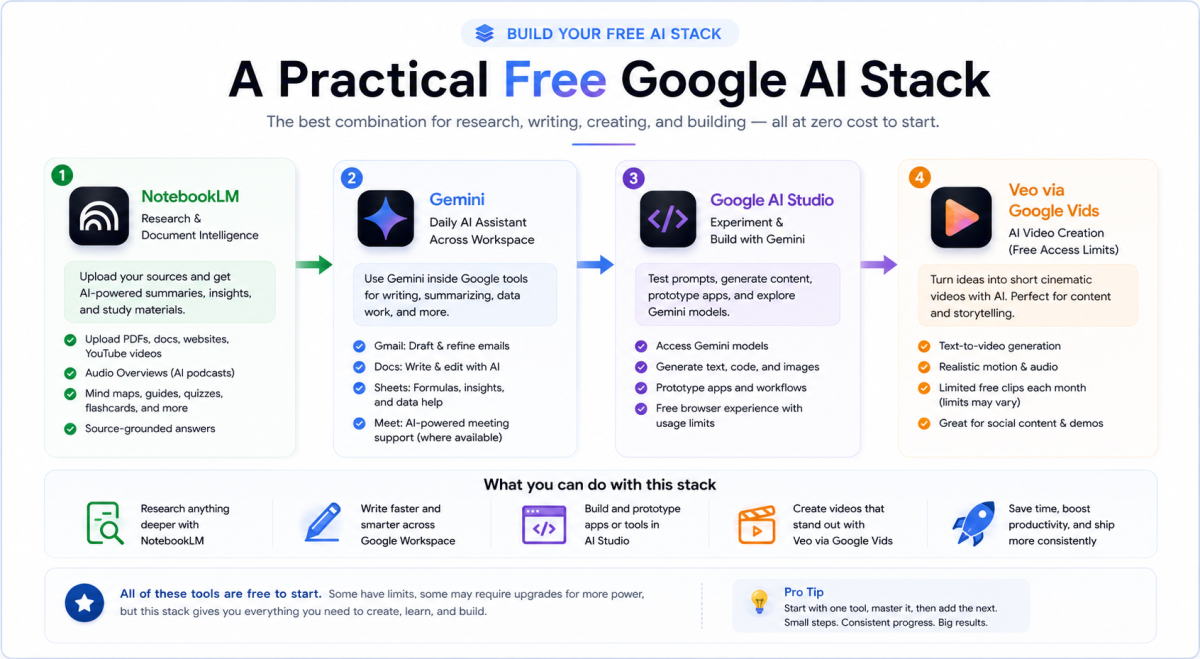
After spending time testing each of these tools against real tasks, here is the honest combination worth building for most people — whether you are a content creator, student, freelancer, or small business owner.
Start with NotebookLM as your research and document processing layer. Upload the sources you need to understand, ask it direct questions, and use the Studio features for audio summaries and study materials. This tool alone justifies the time you spend setting up your Google account properly.
Use Gemini daily inside the Google tools you already have open — Gmail for drafting, Docs for writing assistance, Sheets for formulas and data organisation. The integration value here is about removing switching costs, not about Gemini being the most powerful model available.
Add Google AI Studio when you want to experiment with what Google’s underlying models can actually do — prompt testing, image generation, simple application prototyping. The free browser experience is generous enough for meaningful exploration without any immediate payment commitment.
Use limited AI video access carefully for the content that matters most — a product demo, a social media clip, a short video summary of something complex. Free AI video is not enough for unlimited daily production, but it can be enough to test ideas, create occasional assets, and understand where video generation is heading.
That stack costs nothing to start, covers research, writing, data work, image generation, and video experimentation, and gives you a practical entry point into Google’s AI ecosystem. If you want to see how this Google-specific stack fits into the broader free AI toolkit worth building in 2026, this guide to free AI tools that are genuinely free covers the full picture across every platform worth knowing about.
What the Viral Infographic Got Right and Wrong
I want to be fair about this before closing. The infographic that sparked this post was not deliberately misleading. The tools it listed are real. Google is genuinely building impressive things across many of them. The statement that these tools can save you significant time is accurate for the ones that are properly accessible on the free tier.
What the format of a single infographic cannot convey is nuance. The difference between a tool that is free to test and a tool that is free to use for serious work. The difference between a tool designed for developers and one designed for everyday users. And also the difference between a feature that exists in theory and one that is stable and reliable enough to build your workflow around right now.
The Nuance
That nuance is what separates someone who walks away inspired from someone who actually changes how they work. Google’s free AI ecosystem is genuinely more capable than most people realise — but only the subset of it that is properly free, properly accessible, and properly matched to what you are actually trying to do.
The strongest starting points in this post — NotebookLM, Google AI Studio, Gemini, and limited AI video access through Google’s creative tools — are the ones worth trying first. They solve real problems for real people without requiring deep technical expertise.
Everything else on the list is either genuinely useful but more complicated than advertised, or not as freely accessible as the viral framing suggests. Knowing the difference before you open the first tab saves the frustration that most viral AI tool posts create when the reality does not match the screenshot.
So, What’s the Real Takeaway?
If you want to understand how to use any of these tools more effectively once you have started — not just what they do, but how to get consistently good results from them — this guide to AI tools that actually save time covers the workflow thinking that makes the difference between tools you have and tools you actually use. And if you are thinking about how any of this connects to building real income rather than just productivity, this honest breakdown of what actually pays with AI right now is the most direct next step.
The people getting the biggest advantage from AI right now are not necessarily developers or tech experts. They are ordinary people who started experimenting early while everyone else was still waiting to “figure it all out.”
The tools are there. The free access is real for the right ones. The only remaining question is whether you start using them deliberately instead of just saving the next viral list and forgetting about it.






















Join the discussion Tap to open the comment form +