

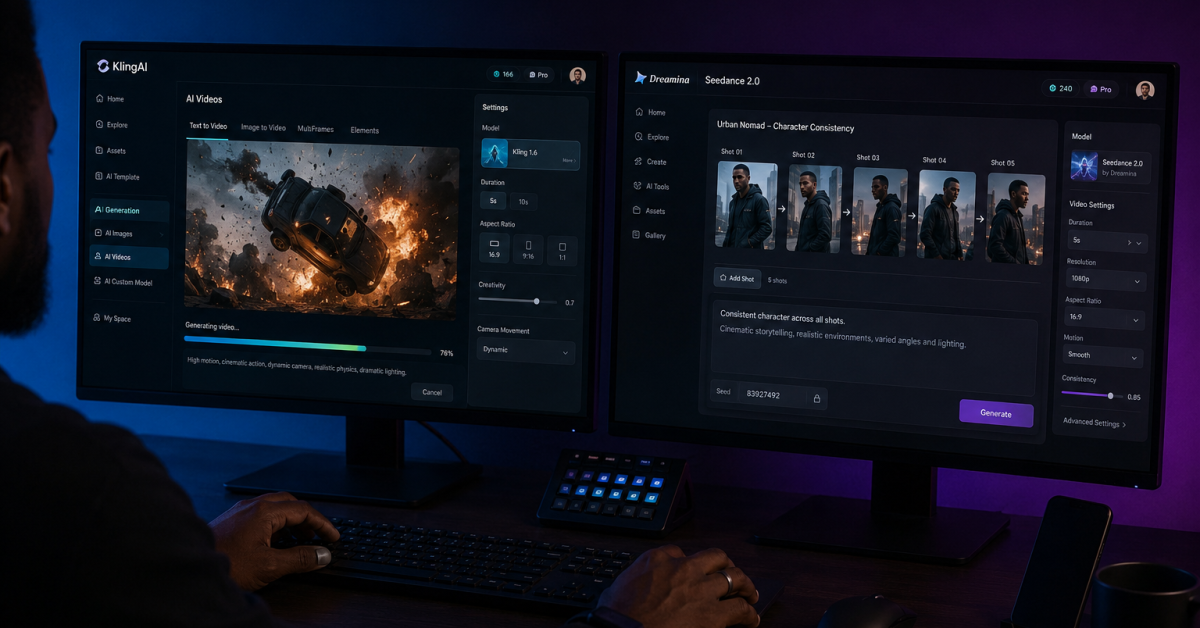
The Kling AI vs Dreamina debate is framed wrong in almost every article covering it, and that framing is what makes the comparison useless for most creators trying to make a real decision.
Most comparisons rank the two tools against each other as if one is supposed to replace the other, declare a winner, and move on.
That approach misses the point entirely. Kling AI and Dreamina are not competing products built to do the same job — they are complementary tools built around completely different production philosophies, and the creator who understands that distinction will make better content, spend fewer credits on bad generations, and build a workflow that actually scales.
This post does not pick a winner. It tells you exactly which tool wins for each specific job so you can stop wasting credits on the wrong platform for the wrong task.
By early 2026, the AI video field had narrowed decisively to two names that pulled ahead of every other competitor on both capability and real-world adoption: Kling 3.0 from Kuaishou and Seedance 2.0 from ByteDance, accessed through Dreamina.
Both launched within weeks of each other in February 2026. Both produce cinematic output that looked technically impossible two years ago.
Also, Both generate native audio alongside video in a single pass. And Both handle character consistency across scenes at a level no previous AI video tool achieved.
The differences between them are not about which is more impressive — they are about what each one was engineered to do, and those engineering decisions determine which tool belongs in which part of your workflow.
The Core Philosophy Difference Nobody Explains Clearly
Kling AI was built around what its developers call a Digital Twin mindset — prioritizing photorealism, precise motion control, and predictable prompt following above everything else.
When you give Kling a detailed prompt describing a specific camera angle, lighting condition, character movement, and scene composition, it executes that prompt with a high degree of literal fidelity.
The output you get back closely matches what you described. That predictability is not a limitation — it is the central design choice that makes Kling the tool of choice for creators who need to control exactly what appears on screen without surprises.
Dreamina with Seedance 2.0 was built around what the platform describes as a Precision Director philosophy, prioritizing narrative control, cinematic motion complexity, and multimodal creative orchestration.
When you give Seedance 2.0 a prompt, it interprets the scene with more creative latitude than Kling — sometimes generating details you did not specify, sometimes handling complex physical motion in ways a literal prompt interpretation would not produce.
This interpretive approach produces more visually dynamic output in high-complexity scenes but requires a different prompting strategy and tolerance for less predictable results.
These are not competing weaknesses — they are different creative tools serving different parts of the same production workflow.
Free Tier Comparison: Where the Real Gap Is
On the free tier, Kling AI gives you 66 daily credits that reset every 24 hours and are dedicated entirely to video generation — no other tools draw from that pool.
Dreamina gives you 225 daily tokens that are shared across image generation, video generation, avatar tools, editing features, and upscaling. In real-world usage, Kling’s 66 dedicated credits produce roughly two to three usable Standard mode clips per day.
Dreamina’s 225 shared tokens produce roughly one to two video clips per day if you protect the balance from non-video tool usage and plan your session before logging in.
The more important free tier difference is what happens to those clips after generation. Both platforms watermark free tier output.
The Free Tier Limitations
Both restrict free tier output from commercial use — Kling explicitly in its Terms of Paid Service, Dreamina through its commercial licensing terms that begin at the Basic paid plan.
Google Veo 3.1 via AI Studio remains the only tool in this stack that produces commercially clean output at zero cost, which is why the zero-budget workflow described in the pillar post on free AI video tools to make money online treats Veo 3.1 as the commercial layer, Kling as the practice and motion-testing layer, and Dreamina as the consistency and storytelling layer.
Each free tier serves a specific function within that structure.
Kling’s free tier has one meaningful advantage over Dreamina’s beyond the dedicated credit pool: it is globally accessible without regional restrictions.
Dreamina’s availability has been geographically fragmented since its international launch in February 2026, with creators in certain regions reporting access issues that Kling users in the same locations do not experience.
If you are building a workflow that requires consistent daily access from Nigeria, India, or Southeast Asia — which describes a significant portion of the FaithfulBiz readership — Kling’s reliability advantage on the free tier is a practical consideration that no benchmark score addresses.
Paid Tier Comparison: The Pricing Decision That Changes Everything
Kling’s Standard plan at $6.99 per month is the cheapest commercial-rights entry point of any major AI video platform in 2026.
Runway charges $15 per month for a comparable commercial tier. Pika charges $28 per month. Dreamina’s Basic plan starts at $15 per month, which is the same price as Runway’s entry tier but includes 1,575 monthly credits and removes the watermark.
The gap between $6.99 and $15 per month matters for a creator who is just starting to build a video content business and needs to control costs before revenue arrives.
The value calculation shifts when you look at what each paid tier actually produces in usable commercial output.
Kling’s Standard plan at $6.99 gives you 660 monthly credits in addition to the daily 66 free credits. At approximately 20 credits per Standard mode five-second clip, that translates to roughly 33 paid commercial clips per month before your daily free credits are factored in.
Dreamina’s Basic plan at $15 per month gives you 1,575 monthly credits. At 115 credits per five-second Seedance 2.0 clip, that translates to approximately 13 commercial clips per month. For a creator focused on volume — running a faceless channel or building a content library — Kling produces more commercial output per dollar at the entry paid tier.
As a Creator Who want The Best
For a creator focused on quality and character consistency per clip, Dreamina’s fewer but more narratively controlled clips may deliver more value per generation.
Dreamina’s credit system has one meaningful structural advantage over Kling’s: credits on paid plans do not expire and roll over month to month.
Kling’s daily 66 free credits disappear at the end of each reset cycle whether you use them or not, but the paid plan credits accumulate when you generate less than your monthly allowance.
A creator who has a busy week and generates heavily, then has a slow week and generates less, can bank Dreamina credits across months and use them during an intensive production period. Kling’s credit structure does not offer this flexibility, which makes Dreamina’s paid tier more forgiving for creators with inconsistent production schedules.
Output Quality: Where Each Tool Actually Wins
In side-by-side generation tests using identical prompts, Kling 3.0 consistently produces more photorealistic human motion than Seedance 2.0 — particularly in high-energy sequences involving physical action, running, sports, or fast movement.
Kling’s motion physics handling is the strongest in the market at its price point, and its prompt adherence is high enough that a detailed cinematography-language prompt reliably produces output that matches the description without unexpected interpretive additions.
For creators building social content around action, energy, and kinetic visual storytelling, Kling’s motion handling is the correct tool.
Seedance 2.0 produces stronger results in complex multi-character scenes, scenes requiring precise audio synchronization, and sequences where cinematic mood and atmospheric detail matter more than kinetic energy.
In a head-to-head test of an astronaut walking through a flooded shopping mall with flickering signs and reflective water documented by Artlist in May 2026, Seedance 2.0’s output was notably smoother with more detailed surface reflections and more naturalistic ambient movement than Kling’s version of the same prompt.
In scenes where physical complexity exceeds what a structured prompt can specify — crowd movements, environmental layering, fabric physics combined with complex lighting — Seedance 2.0’s interpretive approach produces more convincing output than Kling’s literal execution.
The Audio Generation Difference
The audio generation difference is subtle but relevant for production workflows. Both platforms generate synchronized audio in a single pass, eliminating the separate audio editing step.
Kling’s audio handling includes strong multilingual lip-sync accuracy and supports voice-controlled audio generation, making it the stronger choice for content requiring spoken dialogue or narration synchronized to on-screen characters. Seedance 2.0’s audio generation is more cinematic in its ambient layering — sound effects, environmental audio, and background music feel more organically integrated into the scene rather than added as a synchronized layer on top of the visual output.
For narration-heavy content, Kling’s audio approach is more practical. For mood-driven atmospheric content, Seedance 2.0’s audio generation produces a more immersive result. Our breakdown of ElevenLabs income streams covers the voiceover layer when you need production-quality narration that exceeds what either platform’s native audio generates.
Multi-Shot Storytelling: The Interface Difference That Matters
Both platforms handle multi-shot storytelling — generating videos containing multiple distinct scene cuts within a single generation — but their approaches to this capability are architecturally different in ways that affect how you work with each tool.
Kling provides a dedicated multi-shot interface where each shot is planned individually as a discrete unit with its own prompt, duration, camera direction, and character reference.
This structured approach gives you precise control over exactly where each cut lands and how long each shot runs. The tradeoff is that planning a multi-shot sequence in Kling requires more upfront setup work before you generate.
Seedance 2.0 handles multi-shot direction through natural language prompt labeling — you write “Shot 1:” followed by the scene description, then “Shot 2:” with the next scene, and the model interprets the intended cuts from the prompt structure.
This approach is faster to set up and more flexible for spontaneous creative decisions, but gives you less precision over exact cut timing and per-shot duration control.
The community assessment from months of real-world testing is that Kling’s structured multi-shot interface is better when you know exactly what you need and want to control every variable. Seedance 2.0’s prompt-based multi-shot approach is better when you are developing a scene and want to iterate quickly without rebuilding a structured interface from scratch for each variation.
Multi-Shot Prompt Structure for Each Platform:
Kling AI (Structured Interface Approach):
Shot 1 prompt: “Establishing wide shot, coffee shop interior, morning light, empty except for one customer at the window.”
Shot 1 duration: 4 seconds. Camera: slow push in.
Shot 2 prompt: “Medium shot, same customer, opening a laptop, checking notifications, looking focused.”
Shot 2 duration: 4 seconds. Camera: static.Dreamina Seedance 2.0 (Prompt Label Approach):
“Shot 1: Wide shot of a coffee shop interior at morning, one customer sitting at the window with warm light coming through. Shot 2: Medium shot of the same customer opening a laptop, expression focused and calm. Consistent character appearance across both shots. Ambient cafe sounds throughout.”
Character Consistency: Where Dreamina Has a Clear Edge
Character consistency across multiple generations is the capability where Dreamina’s Seedance 2.0 most clearly outperforms Kling AI at equivalent price points. Kling’s Element Library allows you to upload up to four reference images to maintain a character’s appearance across scenes, and the consistency is strong for basic character features — face geometry, general outfit color, and hair color.
Where Kling’s consistency begins to drift is in fine details across extended generation sequences: subtle costume differences, slight facial geometry shifts between takes, and variation in character height relative to scene elements when the same character appears across many different scene types.
Seedance 2.0’s consistency engine, powered by its 12-file multimodal reference system, holds character identity more reliably across a wider range of scene types and camera distances.
Brand colors, specific logo elements, precise outfit details, and facial features stay stable in a way that makes Seedance 2.0 the stronger choice for any creator building a serialized content format around a recurring character.
A faceless YouTube channel, a brand ambassador series, or a social content format built around a fictional AI character all benefit from Dreamina’s consistency capability in a way that would require significantly more prompt engineering and manual correction to replicate in Kling.
For the full breakdown of how Dreamina’s consistency system works at the prompt level, the Dreamina Seedance 2.0 free plan guide covers the multimodal reference workflow in detail.
The Workflow Decision: Which Tool for Which Job
The community consensus that emerged from months of head-to-head creator testing in 2026 is the most honest answer to the Kling vs Dreamina question: serious creators stopped choosing between them and started running both.
The friction of managing two platforms, two credit systems, and two dashboards is real, but it is smaller than the creative limitation of trying to force one tool to do the job the other was designed for.
The creator who uses Kling for motion-heavy kinetic content and Dreamina for character-driven narrative content produces better output than the creator who commits exclusively to one platform and tries to compensate for its weaknesses with prompt engineering.
The practical decision framework for a creator at the zero-budget stage is different from the framework for a creator already generating paid income.
At zero budget, use both free tiers for the jobs each handles best — Kling’s 66 daily credits for motion practice and quick iteration, Dreamina’s 225 daily tokens for character development and consistency testing — and use Google Veo 3.1 via AI Studio for every piece of commercially clean output. At the first paid upgrade stage, the question is which platform’s capabilities are most essential to your specific content format.
A creator building action-forward social clips should upgrade Kling first at $6.99 per month. A creator building a character-driven serialized format should upgrade Dreamina first at $15 per month.
Or A creator generating client video services should upgrade Kling first for volume, then add Dreamina once the character consistency work justifies the additional cost.
Quick Decision Framework:
Use Kling AI when: You need fast iteration, photorealistic human motion, structured multi-shot control, lower entry cost for commercial rights, or content where prompt fidelity matters more than creative interpretation.Use Dreamina Seedance 2.0 when: You need character consistency across many clips, complex motion in dynamic scenes, atmospheric cinematic mood, multimodal reference input depth, or non-expiring credits that accommodate inconsistent production schedules.
Use both when: You are building a content business where different parts of your production require different tools — which is almost always the case once you have been generating consistently for more than a few weeks.
Rendering Speed and Platform Reliability
Kling AI renders faster than Dreamina Seedance 2.0 in repeated real-world tests, and for high-volume workflows this speed difference compounds meaningfully over a month of production.
A creator generating ten clips per day experiences the speed gap as a significant operational difference — faster feedback loops mean more iterations within the same timeframe, which means better output through more creative experimentation.
Kling’s speed advantage is most pronounced at the Standard quality tier. At Professional mode, queue times extend and the gap narrows, particularly during peak usage hours when free tier users experience waits that have exceeded 45 minutes in documented testing.
For Platform reliability for international users
Platform reliability for international users favors Kling by a meaningful margin. Dreamina’s geographic availability has remained fragmented since launch, with creators in various regions outside China, the US, and Western Europe reporting inconsistent access that Kling’s globally deployed infrastructure does not produce.
For a creator in Nigeria building a daily production workflow, platform reliability is not an aesthetic preference — it is a foundational operational requirement.
A tool that produces superior output but is inaccessible on the day you need to generate breaks the workflow in a way that a slightly less capable but consistently available tool does not.
The rendering speed comparison also affects the free tier economics in a practical way. A creator who can generate and review a Kling clip in eight minutes knows by the halfway point of their session whether a retry is needed before the daily credits run out.
A creator waiting significantly longer for a Dreamina generation may find that their single daily generation attempt has consumed most of their available session time, leaving no time for iteration even if the result does not match the intended output.
Speed affects not just how many clips you can generate — it affects how quickly you can learn from each generation and improve your next prompt.
The Honest Recommendation for FaithfulBiz Readers
If you are building a zero-budget video content business right now and can only spend time learning one platform before the other, start with Kling AI.
The reasoning is practical rather than qualitative: Kling’s free tier is more generous in dedicated credits, the $6.99 Standard plan is the cheapest commercial rights entry point in the market, the platform is reliably accessible from any region, and the prompt system responds well to the kind of specific, structured direction that new creators are most likely to write.
The learning curve is shallower, the daily feedback loop is faster, and the first paid upgrade makes economic sense earlier because the commercial output volume justifies the cost sooner.
Add Dreamina to your workflow when one of two things happens: either your content format requires character consistency that Kling’s four-reference element library cannot sustain across your volume of output, or your production style gravitates toward atmospheric, complex-motion storytelling that benefits from Seedance 2.0’s interpretive approach.
If You To Use Both
Both of those are signals that Dreamina’s specific capabilities are now essential to your workflow rather than supplementary. The $15 per month Basic plan becomes the right upgrade when your content demands it — not before.
For a detailed breakdown of how to extract maximum value from Kling’s free tier before making that upgrade decision, the guide on how to use Kling AI for free covers the daily credit workflow, the image-first strategy, and the specific moment the paid plan makes financial sense.
The broader picture is this: both Kling AI and Dreamina are tools in a market that is still moving fast. Seedance 2.5, announced June 23, 2026, will extend native generation to 30 seconds and expand the reference input system even further.
Kling will continue updating its motion capabilities and multi-shot interface. The creator who builds genuine platform fluency on both tools during the current generous free tier window will have a compounding skill advantage over the creator who waited to pick a winner before starting.
The tools are available today, the free tiers are active today, and the window where the learning cost is zero is not permanent.












Join the discussion Tap to open the comment form +