


I used to spend twenty minutes every week just searching through old Claude conversations trying to find something I knew was in there somewhere.
A brief I had worked on. A tone guide I had refined over three sessions. A research summary that took an hour to produce. It was all there — somewhere — buried under hundreds of other chats with no organisation, no context, and no way to find anything quickly.
Then I discovered Claude Projects and realised I had been using Claude like a notepad when it was always capable of being a proper workspace.
If you have never set up a Claude Project, this guide shows you exactly how to do it and why it is one of the most useful things you can do to change how you work with AI.
What Most Claude Users Get Wrong
Most people use Claude the same way every day. They open a new chat, explain who they are and what they need, get their output, close the tab, and repeat the whole thing next time from scratch. Every session starts cold.
Claude has no idea who you are, what your business does, what your voice sounds like, or what you have already worked on together. You are essentially reintroducing yourself to the same tool every single day.
This is not how the most effective Claude users work. They use Projects — and it changes everything about the quality and speed of what they get. Projects are self-contained workspaces, each with their own chat history and their own knowledge base.
Instead of scattered conversations across hundreds of loose chats, everything related to a specific area of your work lives in one organised place.
Claude walks into every conversation inside that Project already knowing your context, your goals, and your preferences. Before diving in, make sure you have the foundation covered — the complete Claude AI beginner’s guide explains everything you need to know about how Claude works before setting up your first Project.
Most people keep opening new chats and starting from zero. Projects are where Claude stops feeling like a chatbot and starts feeling like a workspace.
What Claude Projects Actually Are
A Claude Project is a persistent workspace with three things that regular chats do not have. First, a custom instructions section where you tell Claude everything it needs to know about you, your work, and how you want it to behave — and that context stays active across every conversation you have inside the Project. Second, a knowledge base where you can upload documents, files, and reference materials that Claude can draw from in every session.
Third, a dedicated chat history that is separate from your other conversations so your project work stays organised and findable.
The practical difference this makes is significant. Without Projects, Claude carries assumptions from your marketing work into your financial analysis.
With Projects, each context is clean and contained. A writing project has no awareness of your coding project. A client account has no awareness of your personal research. Each workspace operates independently with exactly the context it needs and nothing it does not.
Quick Setup Checklist
✓ Create a Project
✓ Give it a clear name
✓ Add custom instructions
✓ Upload key documents
✓ Start with a real task
How to Set Up Your First Claude Project (Step by Step)
Setting up a Project takes about ten minutes the first time. The setup itself is straightforward — the quality of what you put into it is what determines how much it changes your work.
Step One: Create the Project
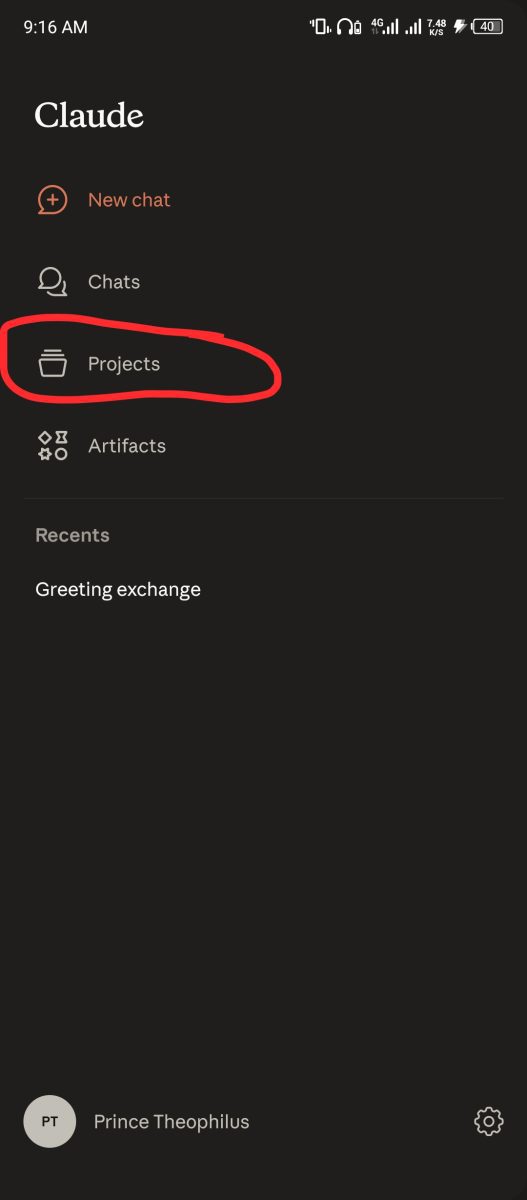
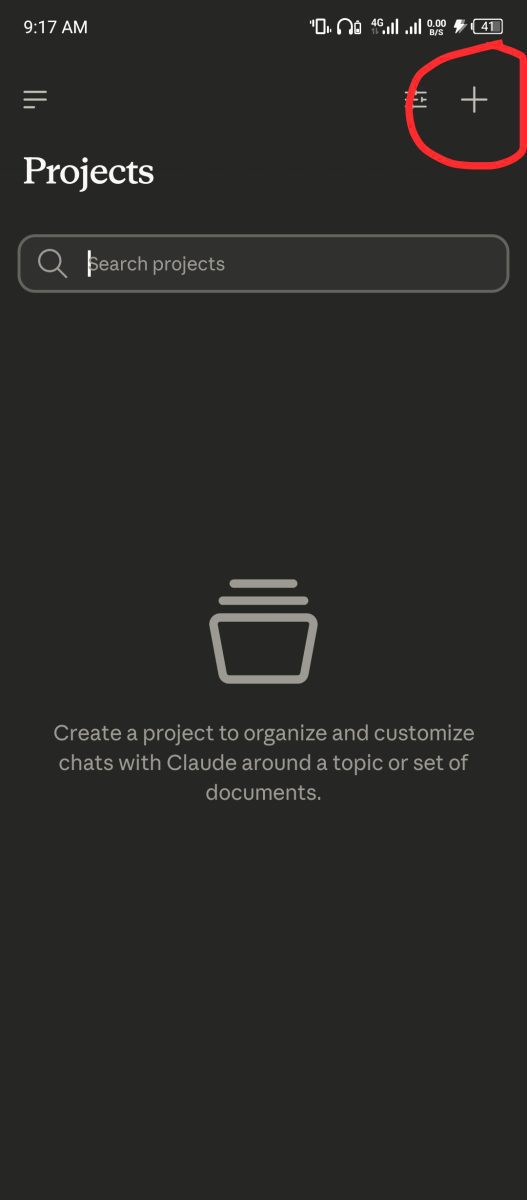
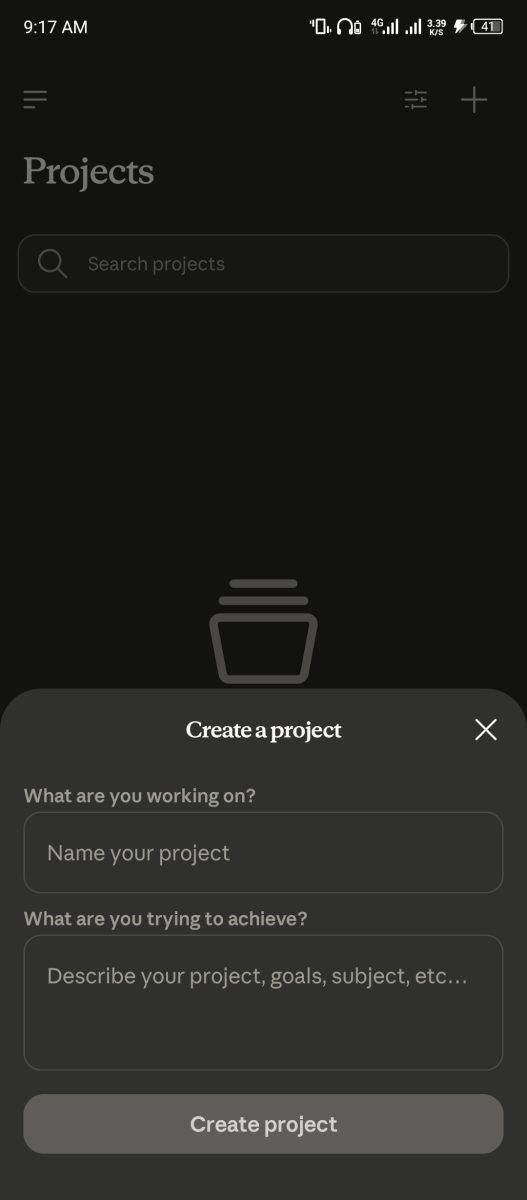
Open Claude on the web or desktop app. On the left side, you will see Projects — click it, or go straight to claude.ai/projects. Click New Project in the upper-right corner. You will be asked for a name and an optional description. Do not rush this step. A project named “Writing” is useless six months later when you have five writing projects. A name like “FaithfulBiz Blog — AI Tools Content” tells you exactly what it is at a glance. Treat the name the way you would label a folder on your computer.
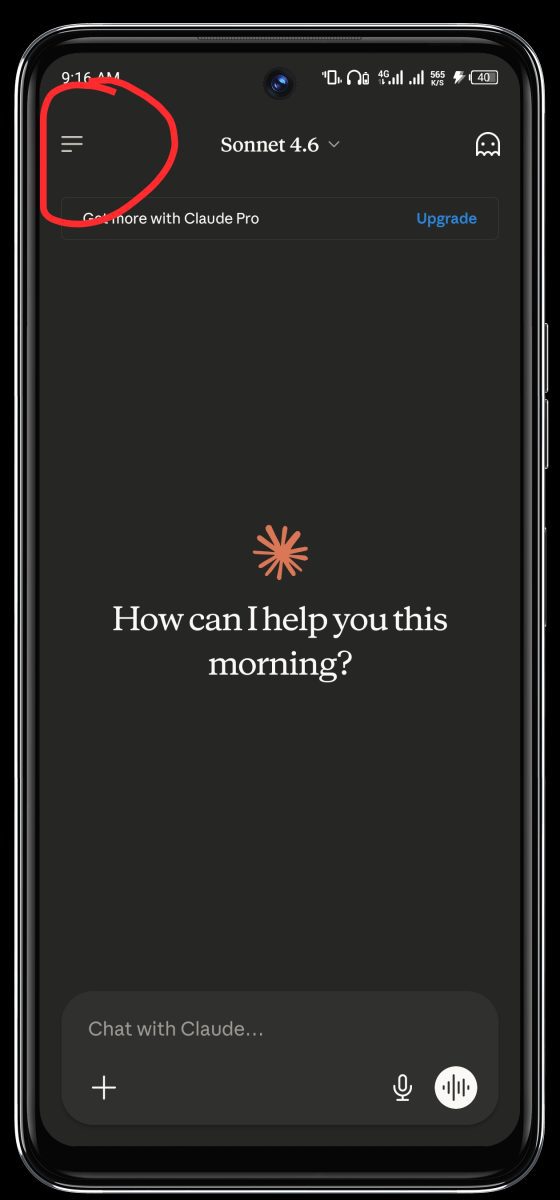
One thing worth knowing before you continue: the name and description are for you, not for Claude. Claude does not read the project name or description, so the actual context still needs to live in your instructions and knowledge base. A well-named project helps you stay organised. A well-written instructions section is what actually changes Claude’s behaviour.
Step Two: Write Your Custom Instructions
This is the most important part of the setup and the step most people rush or skip entirely. Your custom instructions are the context Claude reads at the start of every conversation inside this Project. Think of it as briefing a new team member on everything they need to know before their first day.
A strong instructions section follows a clear structure. Context, rules, and behaviour — Claude needs to know who it is working for, what constraints to follow, and how to respond to different requests.
For a blog writing project, your instructions might explain that this is a blog for everyday people who want to use AI tools to earn money and work smarter, that the tone is conversational but authoritative with short paragraphs and no corporate language, that posts should always include a strong hook and practical steps, and that the focus keyword should appear in the first paragraph naturally.
That level of instruction means every writing session starts with Claude already aligned to your standards — not drifting toward generic AI output because it has no guidance.
For a freelance client project, your instructions would include the client’s business description, their brand voice, their audience, what they have told you about their goals, and any specific requirements they have given you.
Claude then produces work that fits that client without you re-explaining the brief every single time. This is exactly the kind of workflow that separates people who make real money with AI from people who use it occasionally and wonder why the results feel inconsistent.
Step Three: Build Your Knowledge Base
The knowledge base is where you upload the documents and files Claude needs to reference when working inside this Project. You can upload up to 30MB per file with unlimited files, supporting PDF, DOCX, CSV, TXT, HTML, and more formats. Everything you upload becomes part of Claude’s working context for that Project — it can pull from those files, reference them in responses, and use them to ground its outputs in your actual materials rather than general knowledge.
For a blog writing project, upload your best performing posts as style examples, your keyword research documents, your editorial calendar, and any brand guidelines you have written.
For a client project, upload their existing content, their product information, their previous briefs, and any research you have gathered.
And For a business project, upload your business plan, your pricing documents, your competitor analysis, and your financial projections. Claude can then write responses that fit your existing patterns, debug issues in context, and suggest improvements that align with your actual situation rather than generic advice.
Step Four: Start Your First Conversation
Once your instructions and knowledge base are in place, open a new chat inside the Project and give Claude a real task — not a test prompt, a genuine piece of work you need done. You will notice immediately that the response feels different.
Claude does not need you to explain your brand, your audience, or your goals. It already knows. The first response comes back closer to what you need than anything a cold chat would produce, and the editing time drops significantly from that first session onward.
How Many Projects Do You Actually Need?
The right answer depends on how you work, but a practical rule makes this easy to decide. If the work would be carried out efficiently without needing to re-enter context, it belongs in a Project. If it is a one-off task you will never return to, a regular chat is fine.
For most bloggers, freelancers, and small business owners, three to five Projects covers almost everything.
- A content creation Project for your blog work.
- A client Project for each ongoing client relationship.
- A personal Project for research, learning, and planning that does not fit into the others.
Free users get five Projects, which is enough to get started properly. Paid plans offer unlimited projects with enhanced capabilities that expand context capacity significantly.
If you are on the free plan and want to understand whether upgrading makes sense for your workflow, the honest breakdown of Claude Free vs Pro vs Max covers exactly that decision.
Claude Projects vs ChatGPT Custom GPTs: The Honest Comparison
If you have used ChatGPT’s Custom GPTs before, you are probably wondering how Claude Projects compares. They solve the same fundamental problem — giving AI persistent context for specific types of work — but they do it differently and have different strengths.
On context capacity, Claude wins clearly. Claude Projects support a 200K token context window — 56% larger than ChatGPT’s 128K tokens.
In practical terms, Claude can hold a 60-page brand guide plus a 30-page pricing document plus ten past examples simultaneously.
ChatGPT would need to truncate or summarize at that volume. For document-heavy work like blog writing, client proposals, research analysis, and content creation, that context advantage translates directly into better outputs because Claude can reference more of your material at once without losing detail.
On writing quality specifically, Claude Projects outperforms ChatGPT Projects on summarization and information retrieval based on practical testing. For anyone whose primary use case is producing written content, that gap matters every single session.
On features, ChatGPT’s Custom GPTs have advantages Claude Projects do not — Custom GPTs can browse the web, run Python code, generate images via DALL-E, and connect to external APIs via Actions.
If your workflow depends on live data, code execution, or image generation inside the same workspace, Custom GPTs cover more ground. The honest conclusion most serious users reach is the same one we covered in the full ChatGPT vs Claude vs Gemini comparison — use Claude Projects for writing and analysis, and ChatGPT where you specifically need its broader feature set.
Real Project Setups That Actually Work
The best way to understand what a well-configured Project looks like is to see specific examples rather than abstract descriptions. Here are three Project setups that deliver real results for the types of work most people reading this are doing.
The Blog Writing Project
Instructions: Describe your blog’s niche, your target audience in specific terms, your writing tone, your formatting rules, your SEO approach, and two or three examples of posts that represent your best work. Include any phrases you never use and any structural rules you always follow. Knowledge base:
Upload your five best performing posts, your keyword research spreadsheet, your content calendar, and your internal linking map. Result:
Every post Claude helps you write inside this Project starts from the right foundation — on-brand, audience-aware, and SEO-aligned without you spending the first ten messages of every session getting Claude up to speed.
This is the exact setup that makes using Claude for content writing go from useful to genuinely transformative.
The Freelance Client Project
Instructions: Client business description, their target audience, their brand voice with specific examples, their goals for the content you produce, their preferences and dislikes based on feedback you have received, and any standing requirements they have given you. Knowledge base:
Their existing content, their product or service descriptions, their brand guidelines if they have shared them, and any briefs from previous projects.
Result: You open a session, give Claude the task for this week’s deliverable, and what comes back already sounds like the client — not like generic AI output that needs heavy editing before it is usable. For freelancers managing multiple clients, a dedicated Project for each account saves hours every week.
The Business Strategy Project
Instructions: Your business model, your current goals and challenges, your target market, your revenue model, and the specific types of decisions you want Claude to help you think through. Knowledge base: Your business plan, your financial data, your competitive analysis, your customer feedback, and any market research you have gathered.
Use this Project for brainstorming, planning, and pressure-testing ideas — for example asking Claude to evaluate a new pricing tier based on your current conversion data and what the risks might be.
Claude can stress-test your thinking against the actual context of your business rather than giving you generic strategic advice that does not account for your specific situation.
What People Are Saying About Claude Projects in 2026
The feedback from real users who have made the shift from regular Claude chats to Projects is consistent.
The most common observation is that the quality of outputs improves immediately — not because Claude got smarter, but because Claude finally has enough context to do its job properly. Writers report spending significantly less time editing AI output.
Freelancers report being able to onboard new client projects faster because the Project setup becomes a repeatable process.
Business owners report that strategic conversations with Claude become more useful because Claude can reference their actual business data rather than reasoning from generic principles.
Projects are consistently described as the single most underused feature among people who have been using Claude for months.
That pattern shows up again and again in user communities — people who discover Projects after using regular chats for a long time consistently say they wish they had set them up from the beginning.
The feature has been available and improving steadily, but because it requires a few minutes of intentional setup rather than just opening a chat, many users never explore it.
That setup investment is what most people who get excellent results from Claude have made that most casual users have not. Understanding the full range of what Claude can actually do is what separates users who find it genuinely useful from those who feel like they are not getting the value they expected.
Mistakes to Avoid When Setting Up Claude Projects
The most common mistake is writing instructions that are too vague. Instructions like “write in a friendly tone” give Claude almost nothing to work with. Instructions like “write conversationally, use short paragraphs of two to three sentences maximum, avoid jargon, never use corporate phrases like synergy or leverage, and always open with a relatable personal experience” give Claude an actual framework to operate within.
The more specific your instructions, the more consistent and on-brand your outputs will be.
The second mistake is uploading outdated or irrelevant files to the knowledge base. Claude draws from everything in the knowledge base when generating responses — so if you have old content that no longer represents your current direction, remove it. Group related documents, remove outdated materials, and periodically review your knowledge base to ensure Claude accesses the most relevant information. A clean, current knowledge base produces better outputs than a large, cluttered one.
The third mistake is creating too many Projects and not maintaining any of them properly. Five well-maintained Projects with strong instructions and current knowledge bases produce far better results than fifteen Projects that were set up quickly and never updated.
Start with two or three, get them working well, and expand from there as your needs grow. The reason most people fail with AI tools is not the tool itself — it is the lack of intentional setup and consistent use. Projects are where that intentionality pays off most visibly.
The Shift That Changes How You Work With Claude
Setting up your first Claude Project takes about ten minutes. What it gives you in return is a version of Claude that already knows your work, your standards, and your goals before you type a single word. That shift — from explaining yourself every session to simply giving Claude the task — is where most of the time saving and quality improvement actually comes from.
The people getting the most consistent, high-quality results from Claude are not the ones sending the most clever prompts.
They are the ones who spent ten minutes setting up the right context once and then let that foundation do the work across every session that followed.
That is the real advantage of Projects — not a feature, but a fundamentally better way of working with AI that compounds over time. Every conversation builds on a foundation that already exists rather than starting from zero.
Pick one area of your work that you use Claude for regularly, set up a Project for it today, and notice the difference by the end of the week. That first experience is worth more than any guide you will ever read about it — including this one. Whether you are on the free plan or paying for Pro, the plan you are on matters less than how well you have set up your workspace. Projects are available on both. Use them.


























Join the discussion Tap to open the comment form +