

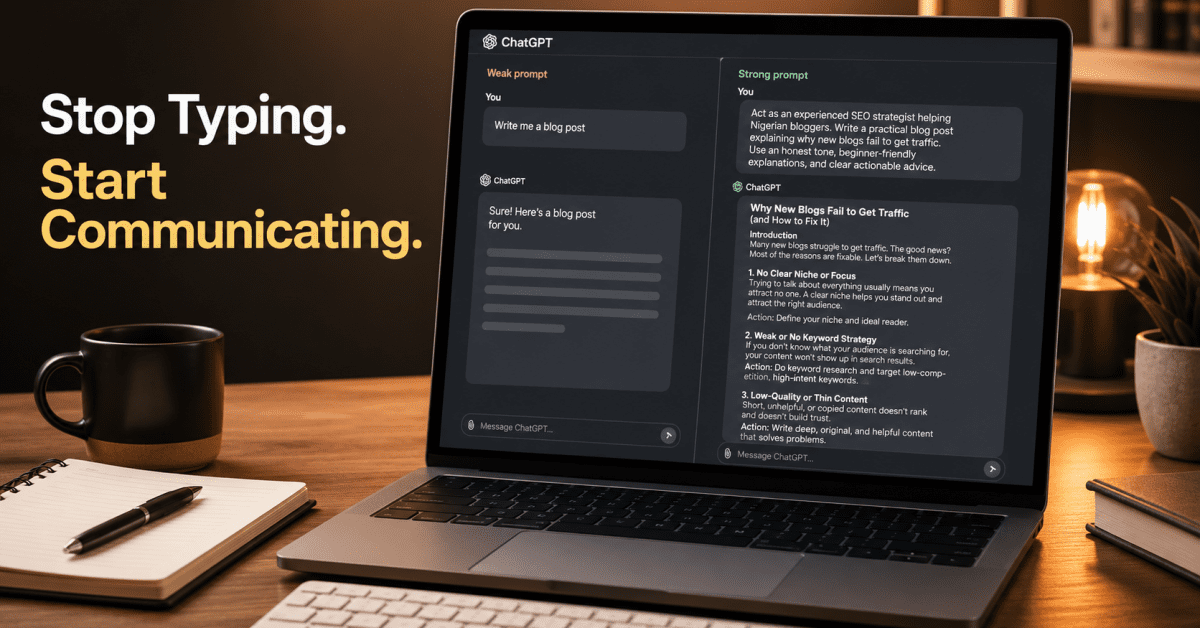
Most people who think ChatGPT is overrated are using it the same way — typing a short question, reading the first response, feeling slightly underwhelmed, and moving on.
I know because I did the same thing when I first started. One-line prompts. Vague instructions. Accepting the first output. Wondering why the results needed so much editing before they were usable. The tool felt like a smarter Google search that occasionally produced something genuinely useful and mostly produced something generic that required significant work to fix.
Then I started paying attention to what I was actually asking for versus what I needed. That shift — from typing a question to genuinely briefing an assistant — changed everything about what I got back.
The people who find ChatGPT transformative and the people who find it underwhelming are rarely using different subscription tiers or different models. They are using the same tool in fundamentally different ways. The gap between those two experiences is not about the AI. It is about the habits and mental models the person brings to the conversation.
These are the twelve habits that actually change your results when using ChatGPT effectively — not prompt templates to copy, but principles to understand so you can apply them to any situation you encounter.
Habit 1: Brief It Like a Colleague, Not a Search Engine
The single most impactful shift in how people use ChatGPT is also the simplest to describe and the hardest to make automatic: stop typing questions and start giving briefs.
When you type a question into Google, brevity works in your favour. Google is matching your words to indexed pages — more words can sometimes hurt by over-constraining the search. ChatGPT does not work this way. It is generating a response based entirely on what you gave it. When you give it a short, vague question, it fills every gap with the most statistically average answer it can construct. That average answer is usually not what you needed.
Think about how you would brief a capable colleague you have just hired. You would not say “write a blog post.” You would say “I need a blog post targeting Nigerian freelancers who are starting their first blog. The audience is practical and slightly sceptical of generic advice. The tone should feel honest and experienced, not motivational. The post should cover why most new blogs fail to get traffic and what the SEO strategy that actually changes the outcome looks like. Around 1,500 words, no generic introductions.”
That brief produces something closer to what you need before a single revision. The principle applies to every ChatGPT task — the more specific the brief, the less editing the output requires. Specificity is not about writing longer prompts for the sake of it. It is about answering the questions a competent person would need answered before starting your task.
Habit 2: Give It a Role Before Giving It a Task
One of the most consistently effective techniques in getting better ChatGPT output is assigning it a specific role before asking for anything. This is the Persona element of the PTCF framework — Persona, Task, Context, Format — which multiple prompt engineering guides from 2026 identify as the most reliable baseline structure for consistent results.
The reason role assignment works is not that ChatGPT suddenly becomes a different AI. It is that the role activates a specific cluster of knowledge, tone, and perspective within the model. “Act as a senior SEO strategist with ten years of experience helping small blogs build organic traffic” tells ChatGPT which part of its training to draw from, what assumptions to make about the level of detail needed, and what professional standard the output should meet. “Write me an SEO strategy” tells it nothing about what quality looks like.
The role does not need to be elaborate or fictional. “Act as an experienced Nigerian freelancer who has been earning in dollars for three years” is enough to shift the perspective and the specificity of the response toward something grounded and practical rather than generic. “Act as a plain-language editor whose job is to make this text clearer without changing its meaning” gives ChatGPT a precise lens for an editing task. The role is a context-setter, not a performance — and it takes five seconds to write.
Habit 3: Always Specify the Format You Want
ChatGPT will choose a format for you if you do not specify one — and the format it chooses by default is optimised for general usefulness rather than your specific situation. It defaults to moderate length, a structure that covers the main points it thinks are relevant, and a tone that is professional but not distinctive.
If you want something different — shorter, longer, more conversational, broken into specific sections, formatted as a table, written as a series of social posts rather than a single piece — you need to say so explicitly. “Write this as three short paragraphs, each under 80 words, in a conversational tone that sounds like advice from a friend rather than a formal guide” produces a fundamentally different output from the same request without those constraints.
Format specifications are particularly important for content that goes directly into use — social media posts, email drafts, headings and subheadings, slide content, product descriptions. Specifying the character count, the number of options you want, the specific elements to include or exclude, and the structural requirements before ChatGPT starts generating means the first output is much closer to usable than the first output from an unspecified request.
Habit 4: Never Accept the First Response as Final
The first response ChatGPT gives you is its best statistical guess at what you need based on your prompt. It is not its ceiling. The most effective ChatGPT users treat the first response as the beginning of a refinement process — a draft that tells you what the model understood from your prompt and gives you specific information about what to adjust.
If the first response is too formal, say “make this more conversational.” If it is too long, say “cut this by half without losing the key points.” Or If it covered the wrong angle, say “I actually need this from the perspective of someone who is starting from zero with no budget — rewrite with that in mind.” And If one section is strong and another is weak, say “keep the third paragraph but rewrite the second — it sounds generic and does not add anything specific.”
Each refinement instruction teaches ChatGPT more about what you need and produces output progressively closer to what you actually had in mind. Three rounds of refinement starting from a decent first draft almost always produces something better than trying to write a perfect prompt from the beginning. The back-and-forth is not a sign that you are using the tool incorrectly — it is the correct way to use it.
Habit 5: Give It Examples of What Good Looks Like
One of the fastest ways to improve ChatGPT output is to show it an example of what the quality and style of the output should look like. This technique — called few-shot prompting in technical terms, but practically just “showing examples” — dramatically reduces the gap between what you are imagining and what the model generates.
If you want ChatGPT to write social media captions in your brand voice, paste two or three of your best-performing captions and say “write five more in this exact style and tone.” Or If you want it to rewrite a piece of content in a specific way, paste a paragraph you consider well-written and say “rewrite this section to sound like the example I just gave you.” And If you want it to produce a specific type of analysis, show it one you have already done and ask it to apply the same analytical approach to new material.
Examples remove ambiguity in a way that descriptions cannot. “Write in a warm, conversational, direct tone” is interpreted differently by different users — and by ChatGPT on different days. A concrete example leaves almost no room for misinterpretation. The model aligns its output to the example rather than to its own default interpretation of your description.
Habit 6: Ask It to Ask You Questions First
For complex tasks — long-form content, detailed strategies, multi-part projects — one of the most effective opening moves is to ask ChatGPT what it needs to know before it starts. The prompt is simple: “Before you write anything, ask me all the questions you need to produce the best possible output. Do not start the task until I have answered them.”
What follows is usually a set of five to ten clarifying questions that reveal exactly which details ChatGPT needs that you had not thought to provide. Your target audience. The tone you prefer. The specific outcome you are optimising for. Any constraints or requirements that are not obvious from the task description. Examples or references that would help calibrate the style.
Answering those questions before ChatGPT starts the task is significantly more efficient than asking it to start, getting a mediocre first draft, and then spending three rounds of revision identifying what was wrong. The information gathering takes two minutes. The revision cycles it eliminates often take twenty.
Habit 7: Use Custom Instructions to Set Permanent Context
Custom Instructions, available in ChatGPT, lets you set permanent context that applies to every conversation automatically, without you having to re-explain who you are and what you need at the start of each session. This is one of the most consistently underused features by regular ChatGPT users, and enabling it properly changes the baseline quality of every conversation.
In the “What would you like ChatGPT to know about you” field, tell it the relevant context about your work. Your niche, Your audience, and Your writing style. The fact that you run a blog in Nigeria targeting online entrepreneurs. The fact that you prefer practical, honest advice over motivational language. Or The fact that you never use bullet lists in your writing. Any standing context that would make every response more relevant to your actual situation.
In the “How would you like ChatGPT to respond” field, set the style and format defaults you always want. No unnecessary caveats. No generic disclaimers. Responses in your preferred length. Specific formatting rules. Direct answers rather than hedged ones. Setting these preferences once means ChatGPT applies them automatically to every conversation — compounding the benefit across every session you run rather than requiring manual configuration each time.
Habit 8: Use the Thinking Model for Hard Problems
Many Plus and Pro users do not realise that switching between ChatGPT’s standard and Thinking models is a meaningful choice that affects output quality for specific types of tasks — not a minor variation.
The standard GPT-5.5 Instant model is optimised for speed and general usefulness. It produces fast, coherent responses for the majority of everyday tasks. The Thinking model — GPT-5.5 in full reasoning mode — applies significantly more computational depth before responding. It works through complex problems step by step before generating output, which produces meaningfully better results for tasks that require logical reasoning, multi-step analysis, mathematical problems, code debugging, complex strategic planning, and situations where getting the answer right matters more than getting an answer quickly.
The practical habit is to know which situations warrant switching to the Thinking model. Use standard for writing assistance, quick research, editing, brainstorming, and everyday questions where the first reasonable answer is sufficient. Switch to Thinking for complex analysis, difficult coding problems, strategic plans with multiple interdependent variables, and any situation where you would want a smart person to think carefully before responding rather than answer immediately.
Habit 9: Treat Hallucinations as a Known Variable, Not a Surprise
ChatGPT hallucinates — it generates confident, plausible-sounding information that is factually wrong. This happens less frequently with GPT-5.5 than with earlier models, but it still happens, and it is more dangerous now precisely because the surrounding content is more reliably accurate. A wrong statistic embedded in otherwise excellent analysis is harder to spot than a response that is obviously confused.
The practical habit is not to be paralysed by this or to distrust every ChatGPT output. It is to apply verification selectively and consistently to the specific elements that most require it. Any specific statistic, date, citation, name, or fact that would embarrass you if wrong — verify it against a primary source before using it. Any claim that sounds surprising or specifically convenient for your argument — check it. The majority of a ChatGPT response on a topic within its training knowledge is reliable. The specific factual claims embedded within that reliable content are the ones worth spot-checking.
Use Perplexity AI for any claim that requires real-time source verification — it provides citations you can click and check, which makes fact-checking dramatically faster than searching manually. Building fact-checking into your workflow as a standard step rather than an exceptional one is the difference between using ChatGPT confidently and being occasionally burned by confident-sounding errors. Understanding when to use Perplexity versus ChatGPT for research gives you a clear framework for routing different types of information needs to the right tool.
Habit 10: Start New Conversations for Different Tasks
One of the most common and consequential ChatGPT workflow mistakes is treating a single conversation as a general-purpose workspace — using the same thread to brainstorm, draft, research, edit, and plan across completely different projects and topics. The longer a single conversation runs across different subjects, the less coherent the context becomes and the less relevant the model’s responses are to any specific task within it.
Different tasks deserve different conversations. The habit to build is opening a new chat every time you switch to a meaningfully different task. Write the blog post in one conversation. Plan the content calendar in another. Research the client background in a third. Each conversation stays focused, the context remains coherent throughout, and the responses stay relevant rather than being subtly influenced by the accumulated context of everything else you did in the same thread.
This habit also keeps your conversations fast. Long, multi-topic threads accumulate rendering weight that slows the browser interface and context weight that slows the model’s response generation. Starting fresh for each task eliminates both problems at once. If you need a deeper explanation of why ChatGPT slows down during long sessions and what to do when it happens mid-task, this guide covers exactly that.
Habit 11: Use Deep Research for Anything That Takes You More Than 30 Minutes to Research Manually
Deep Research — available to Plus users at ten runs per month — is one of the most underutilised features among people who have paid for it. Many Plus subscribers have never run a single Deep Research session. This is a significant missed opportunity for anyone whose work involves research as a regular component.
Deep Research takes a topic or question, searches the web across multiple sources, synthesises the findings into a structured, cited report, and delivers the output in a format that covers the topic comprehensively from multiple angles. For many research-heavy tasks, Deep Research can reduce work that might take hours manually, note-taking, and synthesis take fifteen to thirty minutes with Deep Research. For bloggers researching a new topic before writing. Or For freelancers preparing a client briefing. And For business owners understanding a new market, competitor, or regulatory environment.
The ten monthly runs go further than most people expect if they save Deep Research for genuinely substantial research tasks rather than questions that a standard web search could answer in three minutes. A topic you need to understand comprehensively before writing a major piece of content. A competitor you need to understand before a proposal. A market you need to map before a business decision. These are Deep Research tasks. Quick factual lookups are not.
Habit 12: Build Reusable Prompt Templates for Recurring Tasks
If you do the same type of task in ChatGPT repeatedly — writing social media captions in your brand voice, editing client content to a consistent standard, generating blog post outlines in a specific structure, producing email drafts in a particular tone — the smartest investment you can make is writing one excellent prompt template for that task and saving it somewhere accessible.
The template should include your role assignment, your context, your format specification, your tone guidance, and any standing requirements specific to that task type. The first time you run it, refine it based on the output. The second time, refine again. After three or four iterations, you have a template that consistently produces output close to what you need with minimal additional instruction — turning a task that used to require ten minutes of prompt crafting and three revision rounds into a task that takes two minutes and one.
Store these templates in a Google Doc, a Notion database, or a simple note on your phone. A library of ten well-tested prompt templates for your most recurring tasks is one of the highest-leverage ChatGPT productivity investments you can make — and it compounds in value every time you use one of them rather than starting from scratch.
If you are building a broader AI workflow beyond ChatGPT, this guide on AI tools that actually save time shows where other tools fit around ChatGPT rather than replacing it.
What These Habits Really Change
None of these habits makes
ChatGPT magically smarter.
They reduce ambiguity.
The less ChatGPT has to guess, the closer the output gets to what you actually wanted in the first place.Every habit on this list removes another layer of guessing.
The Principle Behind All Twelve Habits
There is a single principle that connects every habit on this list, and understanding it is more valuable than memorising any specific technique.
ChatGPT is not a search engine. It is not a magic box. It is the most capable general-purpose language model ever built — capable of extraordinary output when directed with clarity, and capable of disappointing generic output when left to fill every gap with its own defaults. Every habit above is a different way of closing the gap between what you are imagining and what you give ChatGPT to work with.
The closer that gap, the better the output. The more gaps you leave — in context, in format, in role, in examples, in refinement — the more the model fills them with averages that do not match your specific situation. That gap is entirely within your control. The tool is the same for every user. What changes is how deliberately you direct it.
If you want to understand the full picture of what ChatGPT can do across all its features and models before applying these habits, the complete ChatGPT guide for 2026 covers everything in one place. If you are still deciding which plan gives you the features worth paying for, the honest comparison of ChatGPT Free vs Plus vs Pro gives you the clearest answer to that question. And if you want to understand how the broader AI toolkit fits together — which tools complement ChatGPT and which replace it for specific tasks — this guide to AI tools that actually save time gives you the full picture.
The gap between users who find ChatGPT transformative and users who find it overrated is almost never about the tool. It is always about the habits. These twelve are where that gap closes.





















Join the discussion Tap to open the comment form +