
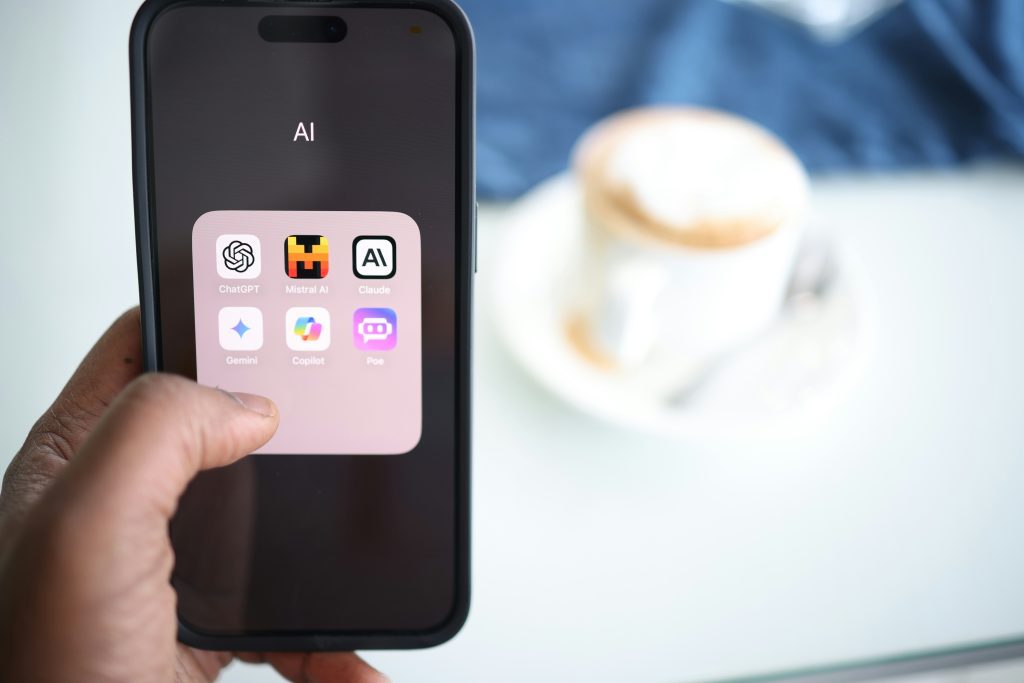
If there’s one thing I’ve learned chasing online income in Nigeria, it’s this: the game changes fast. What worked in 2019 rarely works the same way today. And with AI tools spreading everywhere, a lot of people are confused, some are even scared. Here’s the honest truth: AI isn’t here to take your job. It’s here to make you better at what you do. You just need to learn how to use it.
I’ve tried freelancing, affiliate marketing, digital products, blogging, YouTube, the whole hustle. Across every one of those plays, people who learn to use AI tools properly get ahead faster. They create higher-quality work, save hours every week, and make more money. If you’re just getting started, it helps to first understand some of the best AI tools that actually save time, because once you see how these tools fit into real work, everything starts making more sense.
This guide shows you practical ways to upskill with AI and the exact steps to start earning, even if you only have a phone and a small data bundle.
Why Upskilling Matters Right Now
Nigeria is packed with talent, but job growth is slower than the number of people looking for work. That gap creates opportunity for anyone willing to learn useful digital skills. Upskilling is not a luxury, it’s survival and advantage.
AI lowers the barrier to entry. You don’t need expensive courses or a degree to get started. With a phone and discipline, you can learn faster, produce professional work, and sell those services to clients locally and internationally.
Upskilling with AI means:
- Learning faster, because AI can summarize and explain difficult things in simpler language
- Working better, because AI can help you draft, edit, format, and organize your ideas
- Creating faster, because AI tools can support designs, videos, captions, and voiceovers
- Selling smarter, because AI can help with outreach templates, ad copy, product descriptions, and customer replies
This is not theory anymore. People are already using these tools in practical ways, and if you want real examples, you can see how people are actually using AI today across different income paths.
What “Using AI to Upskill” Actually Looks Like
This isn’t about coding or becoming an engineer, unless you want to. It’s about using tools that help you get more done, learn quicker, and present professional outputs. Think of AI as a 24/7 assistant that helps you draft, design, edit, and improve your work without the delay of doing everything from scratch.
Common outcomes include:
- Faster content production for blog posts, videos, and social media captions
- Better client proposals and pitches that sound more polished
- Cleaner resumes and job applications that get more attention
- Low-cost designs and ads for small businesses
- Repurposed content that reaches more people with less effort
And if you want to understand why these tools behave the way they do, this guide on important AI concepts you should understand will give you that deeper foundation without making it unnecessarily technical.
1. AI for Freelancers: Write Better, Design Faster, Deliver More
Freelancers who use AI produce more work in less time and can offer packages instead of charging only for hours. That matters because clients are not just paying for effort. They are paying for speed, quality, and outcome.
Here’s how to apply AI by role.
Writers and Copywriters
- Use ChatGPT or similar tools to generate outlines, first drafts, and multiple headline options.
- Use Grammarly to clean up your grammar, sharpen your tone, and make your writing more professional.
- Use Perplexity or other research tools to cross-check facts quickly before sending work to clients.
Here’s where the real advantage comes in. Instead of sitting for two hours trying to figure out how to begin an article or sales page, you can use AI to create a rough draft in minutes, then spend your energy making it better. That means more output, faster delivery, and less mental stress.
The mistake many beginners make is copying the AI output directly. Don’t do that. Let the AI help you start, but make the final work sound like a real human wrote it. Add your examples, your context, your style, and your client’s reality. That is what makes the work valuable.
Graphic Designers
- Use Canva or Adobe Express to build flyers, social graphics, thumbnails, and branded posts quickly.
- Use AI-based design suggestions as a starting point, then refine colors, layout, and messaging to fit the client’s brand.
This is powerful because clients often don’t need world-class design. They need clean, effective visuals that communicate clearly and look professional. AI lets you move from blank screen to first draft much faster.
If you’ve ever opened Canva and stared at an empty page, you already know how helpful templates and AI suggestions can be. They remove that first barrier and help you get moving quickly.
Video Editors
- Use CapCut, Pictory, or Descript to cut long content into short clips, add captions, and improve editing speed.
This is where AI becomes a time multiplier. If a creator sends you a 10-minute video, you can quickly turn it into multiple short clips for TikTok, Instagram Reels, or YouTube Shorts. That means you are no longer just offering editing. You are offering repurposing, which is a much stronger service.
If you want to go beyond freelancing and build something more scalable, this guide on building a one-man AI-powered system is the next logical step.
How to start this week:
- Pick one service, such as a 1-page landing page copy draft, 5 social images, or 3 short clips.
- Use one AI tool to produce the first version.
- Polish it properly and deliver to a friend, small business, or first client in exchange for feedback and a testimonial.
2. AI for Small Business Owners (Nigeria): Sell Smarter, Save Money
You don’t need to be a tech person to use AI in your business. Small shops, salons, food vendors, and online sellers can use AI to create better marketing, save time, and reduce the stress of handling everything alone.
Practical tasks AI can handle:
- Write WhatsApp broadcast messages that sound clearer and convert better
- Create weekly promo flyers in minutes
- Prepare short, persuasive product descriptions for marketplaces and social media
- Draft polite customer replies for common complaints and questions
Now this is where many small business owners miss it. AI is not replacing their effort, it is helping them look more organized and more professional. A food vendor who writes better captions and customer replies will usually sell more than one who just posts random pictures with weak descriptions.
Simple implementation:
- Use ChatGPT to draft a week’s worth of WhatsApp broadcast messages
- Use Canva to turn one of those messages into a flyer
- Post it, watch the response, and improve the next week’s version
This is exactly the kind of transformation explained in how AI is transforming small businesses. When small business owners use AI this way, they stop depending only on guesswork.
Tools that work well on phones:
- ChatGPT for drafting and planning
- Canva for flyers and visuals
- WhatsApp Business for customer communication
- Google Docs for planning and record keeping
- Paystack or Flutterwave for payment collection
3. AI for Content Creators: Faster Scripts, Better Editing, More Reach
Content creation is one place AI truly shines because it is output-heavy. If you’re a creator, AI helps you produce more consistently without burning out.
YouTube and Video Creators
- Use ChatGPT to create video outlines and script drafts
- Use ElevenLabs for voiceovers if needed
- Use CapCut or similar tools to cut, caption, and repurpose your content
Instead of spending half the day thinking about what to say in a video, AI can help you create structure quickly. You still need to make the script sound like you, but the hard part, starting, becomes much easier.
Bloggers and Podcasters
- Draft outlines and headlines faster
- Turn long audio or articles into short summaries and captions
- Repurpose one idea into multiple pieces of content
The biggest win here is consistency. A creator who can turn one podcast into a blog post, two social media captions, and a short clip has a major advantage over someone who uses each idea once and moves on.
If you want to understand which tools actually help with that workflow, this post on AI tools you can actually use at home will help you choose more wisely.
What to avoid:
Don’t publish raw AI copy. Always add your perspective, your examples, or your own local angle. That’s what makes your content different from generic internet noise.
4. AI for Students and Job Seekers: Learn Faster, Apply Better
AI helps students and job seekers level up quickly, from studying smarter to applying for opportunities more professionally.
Practical uses:
- Create ATS-friendly resumes and tailored cover letters
- Prepare mock interview questions and ideal answers
- Summarize long lectures, books, or articles into simple bullet points
This is powerful because it reduces overwhelm. A lot of students and job seekers don’t struggle because they are not intelligent. They struggle because they don’t know where to begin. AI helps them create structure.
Sample prompt to try:
“Explain [topic] in simple language for a Nigerian student, include 4 key points and one real-world example.”
Use the output to study, but always cross-check important facts.
And if your goal is not just to get a job but to build valuable skills that pay, this guide on skills that still pay well is a smart next read.
5. Learn AI Itself: Offer Prompt Services and AI Assistance
There’s growing demand for people who can use AI well. Brands, creators, and even small business owners often do not know how to structure prompts or how to turn rough AI outputs into something useful. That’s where you can step in.
Services you can sell:
- Prompt writing or prompt libraries for creators and businesses
- AI-assisted content creation where you handle the tools and deliver polished final work
- Resume and application packages built from AI drafts but refined by you
This is practical, low-barrier work. No coding is required. What matters is understanding how to communicate with the tools, how to refine the results, and how to package the output professionally.
If you want to go deeper into that mindset, this piece on prompt engineering and what matters now adds useful context.
Tools to Start With (All Work on Mobile)
You don’t need to use everything at once. Start with one or two tools, understand how they work, and apply them to real tasks immediately.
ChatGPT — drafting, ideation, and problem-solving.
If you want to learn a skill like copywriting, you can ask ChatGPT to explain it simply, give you practice tasks, and even help you create sample work. Instead of spending hours confused, you get direction quickly.
Canva — designs, flyers, thumbnails, and social content.
Instead of waiting on a designer for every simple visual, you can open Canva, choose a template, replace the text and colors, and create something useful in less than 20 minutes.
Grammarly — grammar, clarity, and tone improvement.
After writing a proposal, article, or email, run it through Grammarly. It helps your message sound clearer and more professional, which increases trust immediately.
CapCut — video editing and content repurposing.
Record a simple video on your phone, upload it, add captions, cut out the unnecessary parts, and turn one long video into short clips for different platforms.
ElevenLabs — AI voiceovers.
If you don’t want to use your voice, you can generate natural-sounding narration for explainer videos, ads, or YouTube content without needing a microphone setup.
Google Docs — writing, organization, and collaboration.
Use it to store ideas, drafts, templates, and client work in one place. It makes editing and sharing easier, especially when you’re working with people remotely.
The goal is simple: pick one tool, apply it immediately, and use the result to build confidence. Once you master one, adding another becomes easier.
How to Start Upskilling (30-Minute Daily Plan)
You don’t need to study AI for hours. Use a short, focused practice routine:
- Pick a skill — writing, design, video editing, resume writing, or outreach.
- Give it 30 minutes daily — 10 minutes learning a tool, 15 minutes applying it to a real task, 5 minutes saving useful prompts and templates.
- Publish something weekly — one post, one sample, or one message that proves you’re improving.
- Offer value immediately — help a friend, a creator, or a small business in exchange for a testimonial or a small fee.
This is how learning turns into income. Long courses without practice often make people feel smart without making them useful.
If your long-term goal is income and stability, this guide on building reliable online income will help you think beyond quick wins.
Common Mistakes and How to Avoid Them
Mistake: Relying on AI output without editing.
Fix: Always add your own voice, examples, and local context.
Mistake: Trying to learn everything at once.
Fix: Focus on one skill and one tool for 30 days.
Mistake: Charging too little because you used AI.
Fix: Price based on the outcome and speed you deliver, not the tool you used.
Mistake: Sharing private client data carelessly with AI tools.
Fix: Avoid uploading sensitive information and use safe workflows.
Know this — Start Small, Start Now
AI is not some distant technology you’ll worry about next year. It’s available now, and it’s a multiplier for anyone willing to learn. If you’re in Nigeria and serious about building digital skills or earning online, this is a practical route:
- Pick one skill
- Learn one tool
- Do one paid job in 30 days
That first paid job proves the idea and opens the door. In a few months, with consistent effort, you’ll be doing work that used to take hours in a fraction of the time, and getting paid for the result.
If this helped, share it with a friend who needs a push. And if you’re serious about turning AI into an advantage, don’t stop here. Keep learning, keep testing, and keep building.

Prince Theophilus (Mr. Prince) is a Nigerian digital entrepreneur, AI-focused content creator, and founder of FaithfulBiz. He helps individuals turn ideas into income by leveraging modern technology, practical strategies, and real-world digital skills.
Over the years, he has worked across freelance platforms, built multiple online projects, and gained hands-on experience using AI tools such as ChatGPT, Claude, Gemini, Canva, CapCut, and other automation platforms to improve productivity and scale online income.
Through FaithfulBiz, he shares clear, beginner-friendly guides, tested strategies, and honest insights on making money online, using AI tools effectively, and building sustainable digital businesses. His goal is to simplify complex concepts and help everyday people take advantage of opportunities in the digital economy without confusion or overwhelm.